
Thread Transfer
Designing multi-session AI that remembers everything
Short-term memory is RAM. Long-term memory is your hard drive. Here's how to architect both for production AI.
Thread Transfer
AI Systems for Builders
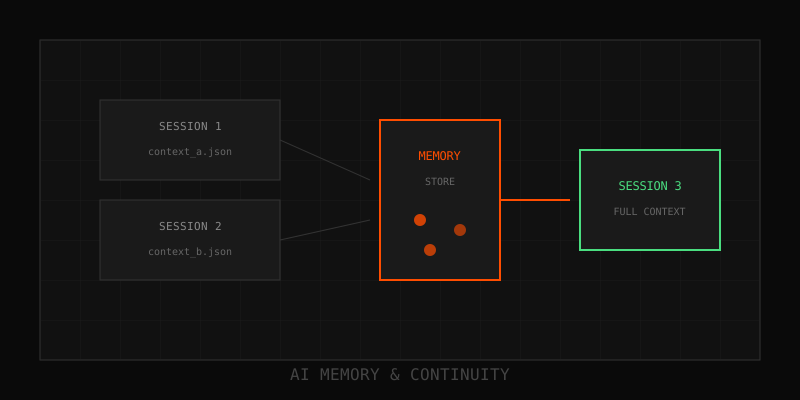
Single-session AI is easy. Multi-session AI—where the agent remembers everything across days, weeks, or months—is where things get real. You need to decide what to persist, how long to keep it, how to surface it efficiently, and how to comply with privacy laws. This post walks through the architecture patterns that make multi-session memory work in production.
Memory types: Short-term vs long-term
Think of your brain. Short-term memory is the last few sentences in a conversation. Long-term memory is your name, preferences, and past experiences.
- Short-term (session memory): Ephemeral context for the current conversation. Lives in the prompt or session store. Expires when the session ends.
- Long-term (persistent memory): Facts, preferences, and decisions that span sessions. Stored in a database. Retrieved on demand.
Most production agents need both. Short-term keeps the conversation coherent within a session. Long-term makes the agent useful over time.
What to store in long-term memory
Not everything deserves persistence. Store:
- User preferences: Language, tone, notification settings
- Facts about the user: Role, company, timezone
- Decisions made: "User approved refund on 2025-03-15"
- Learned patterns: "User always asks for CSV exports"
Skip:
- Transient conversation filler ("thanks," "ok," "got it")
- PII that doesn't need to persist (credit card numbers, SSNs)
- Context better served by session history (last 5 messages)
Architecture patterns
Here's a production-grade setup:
1. Capture phase (during conversation)
Extract facts from user messages using a small LLM. Example prompt:
"Extract any facts, preferences, or decisions from this message: [user message]
Return JSON: {facts: [], preferences: [], decisions: []}"
Store results in a memory table with:
user_idfact_type(preference, decision, learned_pattern)content(the fact itself)confidence_score(0.0-1.0, based on LLM certainty)created_atexpires_at(for auto-deletion policies)
2. Retrieval phase (on each turn)
When the user starts a new session:
- Query the memory table for
user_id - Use hybrid search: semantic (vector similarity) + keyword (exact match)
- Retrieve top-5 relevant facts
- Inject into system prompt as "User context"
Example injection:
System: You are a helpful assistant.

User context:
- Prefers concise responses
- Works in engineering at Acme Corp
- Approved refund on 2025-03-15
3. Decay phase (automatic cleanup)
Old facts should fade. Implement:
- Time-based decay: Delete facts older than 90 days (configurable per fact type)
- Confidence decay: Downweight low-confidence facts over time
- Contradiction handling: If a new fact conflicts with an old one (e.g., user changes email), replace the old one
Run a nightly cron job to purge expired facts.
Privacy considerations
Multi-session memory stores sensitive data. You need:
- Retention policies: Define how long different memory types live. Preferences might be 1 year, decisions 30 days.
- User deletion: "Right to be forgotten" requires a
DELETE FROM memory WHERE user_id = ?endpoint. Make it work. - PII redaction: Strip credit cards, SSNs, and other PII before storing facts. Use regex or a PII detection API.
- Access control: Memory for user A must never leak to user B. Enforce strict scoping in queries.
Pro tip: Log every memory read/write with user_id and timestamp. If a compliance audit comes, you need provenance.
Schema design
Here's a minimal memory table:
CREATE TABLE agent_memory (
  id UUID PRIMARY KEY,
  user_id UUID NOT NULL,
  fact_type VARCHAR(50),
  content TEXT NOT NULL,
  confidence FLOAT DEFAULT 1.0,
  embedding VECTOR(1536),  -- for semantic search
  created_at TIMESTAMP DEFAULT NOW(),
  expires_at TIMESTAMP,
  INDEX (user_id, created_at),
  INDEX (user_id, fact_type)
);
If your DB supports vector search (Postgres + pgvector, Pinecone, Weaviate), store embeddings for semantic retrieval.
Implementation checklist
- Capture facts during conversation: Use a small LLM to extract structured data from user messages.
- Store with metadata: user_id, fact_type, confidence, expiration.
- Retrieve on session start: Hybrid search (semantic + keyword) for top-5 relevant facts.
- Inject into prompt: Add retrieved facts to system message or user context section.
- Handle decay: Auto-delete or downweight old facts. Run nightly cleanup.
- Implement deletion: Users must be able to delete their memory. Build the endpoint.
- Redact PII: Strip sensitive data before storing.
Testing strategies
Memory bugs are subtle. Test:
- Persistence: User states a preference in session 1. Session 2 (next day) should remember it.
- Updates: User changes a preference. Old value should be replaced, not duplicated.
- Isolation: User A's memory never leaks to user B.
- Decay: Facts older than retention policy are deleted.
- Deletion: User requests memory wipe. All their facts are gone.
Write automated tests for each. Memory bugs in prod are embarrassing and expensive.
Tools and libraries
- Mem0: Open-source memory layer with auto-tiering. Easiest to integrate with LangChain agents.
- LangGraph: Stateful agent framework. Define memory graphs explicitly.
- Pinecone/Weaviate/Qdrant: Vector DBs for semantic memory retrieval.
- Postgres + pgvector: If you want to keep everything in one DB.
When to skip multi-session memory
Not every agent needs this. Skip if:
- Your agent is single-use (e.g., one-shot summarizer, FAQ bot)
- Compliance prohibits long-term storage
- You're in rapid prototyping mode and context windows are still cheap
Otherwise, multi-session memory is what turns a chatbot into a personalized assistant.
Next steps
Start with a simple fact table. Capture 3 types of facts: preferences, decisions, learned patterns. Retrieve top-5 on each turn. Iterate from there.
Questions? Email info@thread-transfer.com
Learn more: How it works · Why bundles beat raw thread history