
Thread Transfer
Human-AI handoff done right: The complete 2025 playbook
Context continuity is the #1 success factor for handoffs. Here's every pattern you need to get it right.
Thread Transfer
AI Systems for Builders
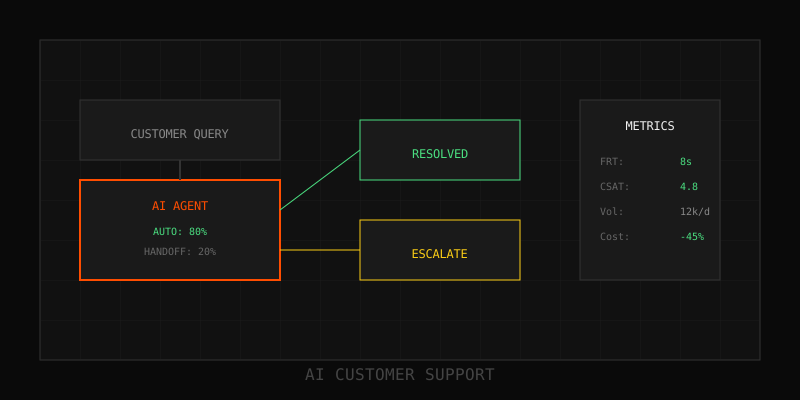
The number one complaint about AI customer support isn't accuracy—it's the handoff. Customers start with AI, realize they need a human, and then have to repeat everything. That failure mode kills CSAT faster than any hallucination. The 2025 playbook for handoffs is simple: full context transfer, smart routing, zero repeated questions. This post is the implementation guide.
Handoff fundamentals: What makes or breaks the transition
A successful handoff has three non-negotiable properties:
- Context continuity: The human agent sees everything the customer told the AI—verbatim conversation history, customer profile, AI's attempted solution, and escalation reason.
- Zero redundancy: The customer never repeats information. "I already told the bot" is a CSAT death sentence.
- Instant acknowledgment: When a customer requests a human, acknowledge immediately ("Connecting you now…") even if queue time is 5 minutes. Silence kills trust.
Context transfer architecture
Full context transfer requires a shared context layer between AI and human systems. Here's the architecture pattern teams use:
1. Conversation bundle
Every AI interaction is logged in a structured bundle: customer ID, conversation history (messages + timestamps), intents detected, AI responses, confidence scores, and escalation trigger. This bundle is immutable and portable—it can move from chatbot to CRM to agent desktop without loss.
2. Handoff metadata
Attach to every escalation:
- Escalation reason: Customer request, low confidence, sentiment spike, policy rule
- AI's last action: What the AI tried to do before escalating
- Customer sentiment: Frustrated, neutral, satisfied (based on tone analysis)
- Suggested next steps: AI proposes what the agent should try (optional but helpful)
3. Agent-facing summary
Agents don't want to read 50 messages. Generate a 3–5 sentence summary: "Customer asked about refund policy for annual plan. AI provided standard policy but customer wants exception due to recent bug. Sentiment: frustrated. Last response: 2 min ago." Agent reads summary, scans full history if needed, and responds with full context.
Smart routing: The right human, first time
Not all humans are equal. Routing escalated tickets to the right specialist improves resolution time and CSAT. Routing logic should consider:
- Intent: Billing questions → billing team. Technical issues → support engineers.
- Customer tier: Enterprise accounts → dedicated account manager. Standard → general queue.
- Complexity: Simple escalations → tier-1 agents. Multi-step troubleshooting → tier-2.
- Availability: If the ideal agent is offline, route to next-best with context intact.
Use a routing table that maps (intent + tier + complexity) → agent pool. Update the table quarterly based on resolution time and CSAT data.
Implementation patterns
Pattern 1: Inline escalation (chat/messaging)
Best for real-time channels (live chat, in-app messaging):
- Customer clicks "Talk to a human" button
- AI generates context bundle and summary
- System checks agent availability; if online, transfers immediately with context
- Agent sees summary + full history in their dashboard; greets customer by name, references prior context
- Customer continues conversation seamlessly
Critical: The handoff message should acknowledge context: "Hi Sarah, I see you were asking about refund options for your annual plan. Let me help with that." No "How can I help you today?"
Pattern 2: Asynchronous escalation (email/ticket)
Best for email support or ticket systems:
- AI attempts resolution via email but detects escalation trigger (low confidence, follow-up, etc.)
- AI creates a support ticket with full context bundle attached
- Ticket is routed to appropriate agent queue with priority flag
- Agent opens ticket, reads summary, and responds—no back-and-forth to gather info
Bonus: Include AI's draft response in the ticket notes. Agents can approve, edit, or rewrite—saves 30–50% of drafting time.
Pattern 3: Blended assistance (AI + human simultaneously)
Advanced teams use AI to assist humans during live interactions:
- Customer escalates to human
- Agent takes over, but AI continues to monitor conversation
- AI suggests KB articles, macros, or next steps in real-time to the agent
- Agent accepts or ignores suggestions; stays in control
This pattern boosts agent productivity by 30–50% and improves consistency. Requires tight integration between agent desktop and AI backend.
Monitoring handoff quality
Track these metrics weekly to catch handoff failures early:
- Handoff CSAT: Survey customers post-resolution: "How smooth was the transition from bot to agent?" Target: >85%.
- Repeat question rate: Percentage of escalations where the agent asks the customer to repeat info. Target: <5%.
- Time to first human response: From escalation request to agent reply. Target: <2 minutes for live chat, <1 hour for email.
- Resolution time (AI-started tickets): Compare to human-only tickets. AI-started should be faster due to pre-gathered context.
- Agent feedback: Survey agents monthly: "Is the AI-provided context helpful?" If <80% say yes, improve summary quality.
Common handoff failures and fixes
- Failure: Agent can't see conversation history
Fix: Integrate AI conversation logs into agent CRM/ticketing system. Surface history in the agent UI, not buried in attachments. - Failure: Customer waits in queue with no acknowledgment
Fix: Send immediate auto-reply when escalation is triggered: "We're connecting you to a specialist. Current wait time: ~3 min." - Failure: Handoff context is too verbose
Fix: Use AI to generate concise summaries. Agents need 3–5 sentences, not full transcripts. - Failure: AI escalates too early or too late
Fix: Tune confidence thresholds. If escalation rate > 20%, AI is giving up too soon. If CSAT on AI-handled tickets < 80%, it's giving up too late.
Handoff playbook checklist
Before you go live, confirm:
- [ ] Conversation bundles include full history, metadata, and escalation reason
- [ ] Agent UI displays AI-generated summary prominently
- [ ] Routing logic maps intents to correct agent pools
- [ ] Customers receive instant acknowledgment on escalation request
- [ ] Agents can access full transcript if needed, but summary is sufficient 90% of the time
- [ ] Handoff CSAT is tracked separately from overall CSAT
- [ ] Escalation reasons are logged and reviewed monthly
Next steps
Audit your current handoff flow. Shadow 5–10 escalations and identify where context is lost. Build the bundle schema, integrate it into your agent system, and measure handoff CSAT. If you're below 80%, the ROI of fixing it is massive—every percentage point of CSAT improvement translates to retention and NPS gains downstream.
Learn more: How it works · Why bundles beat raw thread history