
Thread Transfer
AI-first support architecture: Layers, routing, and fallbacks
Layer 1: Basic AI. Layer 2: AI + tools. Layer 3: Human handoff. Layer 4: Human + AI collab. Full breakdown inside.
Thread Transfer
AI Systems for Builders
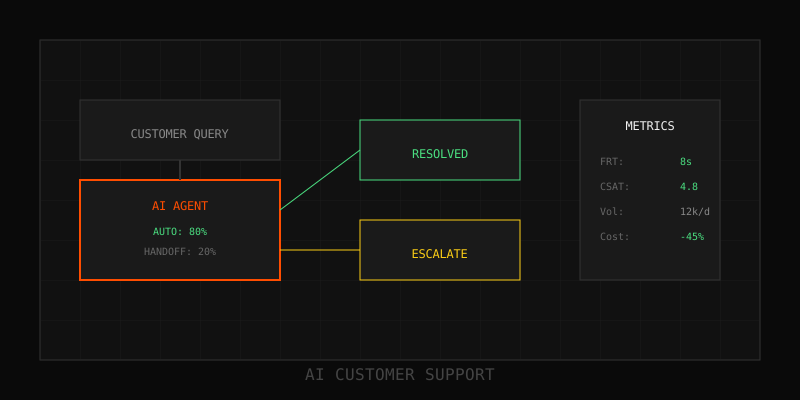
Traditional support is human-first with AI bolted on. AI-first support inverts the stack: AI is the default, humans are the exception. That shift unlocks 70–85% automation rates, sub-minute response times, and 24/7 coverage without ballooning headcount. This post maps the 4-layer architecture that makes it work, along with routing logic, fallback patterns, and scaling considerations.
The 4-layer architecture
AI-first support is structured as a tiered system where each layer handles progressively more complex requests. Every ticket enters at Layer 1 and escalates only when necessary.
Layer 1: Self-service AI (FAQ + simple automation)
What it handles:
- FAQs: "What's your refund policy?" "How do I reset my password?"
- Simple account actions: password resets, email changes, subscription checks
- Status lookups: order tracking, payment confirmation, account balance
How it works:
Lightweight chatbot (GPT-4o-mini, Claude Haiku) retrieves from knowledge base or executes predefined actions. Confidence threshold: 95%. If below, escalate to Layer 2. Average resolution time: <30 seconds.
Automation rate: 60–70% of total volume
Layer 2: AI + tools (complex automation, multi-step flows)
What it handles:
- Multi-step troubleshooting: "My integration isn't working"
- Account modifications requiring validation: plan changes, billing updates
- Contextual recommendations: "Which plan should I choose?" based on usage data
How it works:
AI orchestrates tools (CRM API, billing system, logs) to gather context and execute actions. Uses agentic patterns: plan, act, verify. Confidence threshold: 85%. Average resolution time: 2–5 minutes.
Automation rate: 10–15% of total volume (70–85% cumulative with Layer 1)
Layer 3: Human takeover (AI couldn't resolve)
What it handles:
- Edge cases AI can't solve (rare bugs, unusual account states)
- Customer explicitly requests human ("I want to talk to a person")
- Sentiment escalation (customer is frustrated, language is negative)
- Policy exceptions requiring judgment (refunds outside policy window)
How it works:
AI generates full context bundle (conversation history, attempted solutions, escalation reason) and routes to appropriate human queue. Agent picks up with complete context—no repeat questions. Average resolution time: 10–30 minutes.
Volume: 10–20% of total tickets
Layer 4: Human + AI collaboration (complex, high-value)
What it handles:
- Enterprise escalations requiring account manager involvement
- Technical deep-dives (onboarding, custom integrations, debugging)
- Strategic conversations (renewals, upsells, churn risk)
How it works:
Human leads the interaction, but AI assists in real-time: suggests KB articles, drafts responses, retrieves account history, proposes next steps. Agent accepts or ignores suggestions. AI learns from agent actions and improves suggestions over time.
Volume: 5–10% of total tickets
Routing logic: How tickets flow between layers
Every ticket enters Layer 1. Escalation happens when:
- Confidence < threshold: AI isn't sure → escalate to next layer
- Customer request: "Talk to a human" → skip to Layer 3
- Sentiment spike: Negative sentiment detected → escalate to Layer 3
- Policy rule: Account tier = Enterprise → escalate to Layer 4
- Retry loop: Customer rephrases question 2+ times → escalate to Layer 3
Routing table example (simplified):
| Condition | Route to |
|---|---|
| Intent = FAQ, confidence > 95% | Layer 1 (auto-resolve) |
| Intent = troubleshooting, confidence > 85% | Layer 2 (AI + tools) |
| Confidence < 85% OR sentiment = negative | Layer 3 (human) |
| Account tier = Enterprise OR value > $10k | Layer 4 (human + AI) |
| Customer says "talk to human" | Layer 3 immediately |
Fallback patterns: What happens when things break
AI-first systems need robust fallbacks to prevent customer frustration when AI fails:
1. Graceful degradation
If Layer 2 (AI + tools) fails (API timeout, tool error), fall back to Layer 1 response (KB-only) or escalate to Layer 3. Never leave the customer hanging with "something went wrong."
2. Circuit breaker
If AI error rate for a specific intent exceeds 10% in a 10-minute window, automatically disable automation for that intent and route all new tickets to humans. Alert ops team. Re-enable once issue is resolved and tested.
3. Escape hatch
Every AI interaction includes a visible "Talk to a human" button. Never hide it. Customers who want humans should get humans—fast.
4. Timeout escalation
If AI takes >10 seconds to respond (API latency, slow retrieval), proactively offer human handoff: "This is taking longer than expected. Would you like to speak with a person instead?"
Implementation roadmap
You don't build all 4 layers at once. Phased rollout:
Phase 1: Layer 1 (Months 1–3)
- Identify top 20 FAQs and simple automations (password reset, status lookup)
- Build knowledge base, deploy chatbot, measure automation rate and CSAT
- Target: 50–60% automation, 80%+ CSAT on automated tickets
Phase 2: Layer 3 (Months 2–4, parallel with Layer 1)
- Build handoff infrastructure: context bundles, agent UI integration, routing logic
- Train agents on new workflow (AI-started tickets come with context)
- Measure handoff CSAT and time-to-first-response
Phase 3: Layer 2 (Months 4–6)
- Add tool integrations (CRM, billing, logs) and multi-step flows
- Deploy agentic workflows for troubleshooting and account modifications
- Target: 70–80% cumulative automation
Phase 4: Layer 4 (Months 6+)
- Build AI co-pilot for agents: real-time suggestions, draft responses, KB retrieval
- Measure agent productivity lift (30–50% improvement typical)
Scaling considerations
As volume grows:
- Cache common responses: If "What's your refund policy?" gets asked 1,000 times/day, cache the response and serve instantly without LLM calls. Saves cost and latency.
- Batch low-priority tickets: Email tickets can be batched and processed async. Prioritize real-time channels (chat, phone).
- Horizontal scaling: AI layers scale horizontally (add more workers). Human layers don't (hire more agents). That's why maximizing Layers 1–2 is critical.
As complexity grows:
- Intent proliferation: You'll start with 15–20 intents. A year later, you'll have 50+. Use hierarchical intent trees (billing → refund → policy exception) to keep routing manageable.
- Knowledge base sprawl: 100 articles today, 1,000 articles next year. Invest in semantic search and retrieval quality early. Bad retrieval kills AI accuracy.
Success metrics
Track weekly:
- Automation rate by layer: What % resolves at Layer 1, 2, 3, 4?
- CSAT by layer: Layer 1 should be 80%+, Layer 3/4 should be 85%+
- Escalation rate: What % of tickets move between layers? Target: <20%
- First-response time: Layer 1 = seconds, Layer 2 = minutes, Layer 3 = <2 min
- Resolution time: Track median and P95 by layer
Next steps
Map your current ticket volume by complexity. Identify which % are FAQ-tier (Layer 1), which need tools (Layer 2), and which require humans (Layers 3/4). Start with Layer 1, measure relentlessly, and expand from there. The architecture is simple—execution is everything.
Learn more: How it works · Why bundles beat raw thread history