
Thread Transfer
Why Your Meta Ads Budget Burns Out by Noon (And Costs You 15% More)
Your budget exhausts by noon while your audience scrolls at 8pm. This pacing problem costs advertisers 15-25% in wasted spend. Here's the fix.
Thread Transfer
Founder, Meta Ads Audit
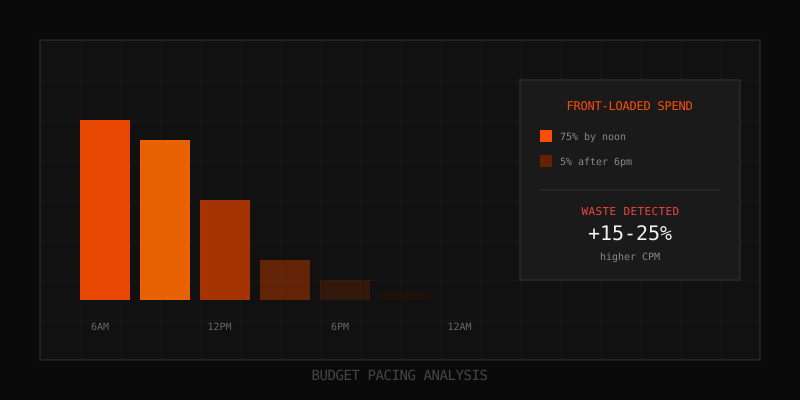
It's 2pm. Your Meta Ads daily budget is already exhausted. Meanwhile, your highest-converting audience—the after-work scrollers—won't even open Instagram until 7pm. This pattern has a name: front-loaded spend. It's one of the most common and costly pacing problems in Meta advertising, and most advertisers don't even know they have it.
Front-loaded spend occurs when your ad sets burn through the majority of their daily budget in the morning hours, leaving nothing for peak engagement periods. The result? You're paying premium CPMs during low-intent hours and missing your best opportunities entirely. Our analysis of thousands of ad accounts shows this problem costs advertisers 15-25% more per conversion than properly paced campaigns.
What Is Front-Loaded Spend?
Front-loaded spend is a budget pacing anomaly where 70% or more of your daily ad spend occurs before noon. Meta's delivery system starts each day at midnight with a fresh budget allocation. If your bid strategy and audience settings aren't calibrated correctly, the algorithm may exhaust your budget aggressively in the early hours, leaving you invisible during peak engagement times.
Here's what a typical front-loaded spend pattern looks like compared to optimal pacing:
| Time Block | Front-Loaded Pattern | Optimal Pacing | Difference |
|---|---|---|---|
| 12am - 6am | 25% | 15% | +10% |
| 6am - 12pm | 50% | 25% | +25% |
| 12pm - 6pm | 20% | 30% | -10% |
| 6pm - 12am | 5% | 30% | -25% |
Notice the problem? With front-loaded spend, you're serving 75% of impressions before noon—but for most consumer audiences, the evening hours (6pm-10pm) deliver the highest engagement and conversion rates.
Why Front-Loaded Spend Happens
Understanding the causes helps you prevent this pattern from forming in the first place. There are four primary triggers:
1. Lowest Cost Bidding Without Schedule
Meta's "Lowest Cost" bid strategy (the default) tells the algorithm to get you as many results as possible within your budget. Without additional constraints, the algorithm may interpret this as "spend as fast as possible when competition is low." Early morning hours often have lower CPMs, so the algorithm aggressively captures these cheaper impressions—even if they're not your best-converting opportunities.
2. Budget Resets at Midnight
Every day at midnight (account timezone), your daily budget resets to 100%. The algorithm sees a full budget and begins spending immediately. If your audience has any activity in the early hours, the algorithm will capture it—draining budget that should be reserved for peak periods.
3. Accelerated Delivery (Legacy Setting)
While Meta has deprecated accelerated delivery for most campaign types, some older campaigns or certain objective combinations may still exhibit accelerated behavior. This setting explicitly tells Meta to spend your budget as quickly as possible, virtually guaranteeing front-loaded spend.
4. Small Budget + Large Audience
When your daily budget is small relative to your audience size, the algorithm has limited opportunities to pace strategically. It may burn through budget quickly on the first available impressions rather than waiting for optimal delivery windows.
The True Cost of Front-Loaded Spend
Front-loaded spend doesn't just mean showing ads at the wrong time. It creates a cascade of negative effects that inflate your true cost per acquisition:
Higher CPMs in Low-Competition Windows
Counterintuitively, early morning can actually have higher CPMs for certain audiences. Why? Fewer advertisers are competing, but fewer users are active too. The result: you're paying for a smaller, less engaged pool. When your budget exhausts by noon, you miss the evening inventory glut where CPMs often drop due to increased supply.
Lower Engagement and Conversion Rates
Users scrolling at 6am have different intent than those browsing at 8pm. Morning users are often in "get-ready" mode—checking notifications, not shopping. Evening users are in relaxation mode, more likely to browse, engage, and purchase. By exhausting budget in the morning, you're optimizing for the wrong behavior.
Incomplete Data for Optimization
Meta's algorithm learns from conversion data. If your ads never run during peak hours, the algorithm never learns what performs best during those windows. You're training the model on a biased dataset, which perpetuates poor pacing decisions.
The 15-25% Cost Premium
Based on our analysis of accounts with front-loaded spend patterns vs. properly paced accounts, we consistently see a 15-25% CPA premium for front-loaded campaigns. For an account spending $10,000/month, that's $1,500-2,500 in waste—every single month.
How to Detect Front-Loaded Spend in Your Account
You can't fix what you can't see. Here's how to detect front-loaded spend in your Meta Ads account:
Method 1: Hourly Breakdown in Ads Manager
Navigate to Ads Manager, select your ad set, and click "Breakdown" → "By Time" → "Hour." Export 14+ days of data to see patterns. Look for:
- 70%+ of spend occurring before noon consistently
- Minimal or zero spend in 6pm-10pm windows
- High early-morning spend with low conversion rates
Method 2: CSV Export Analysis
Export your hourly performance data as CSV and calculate the AM share (hours 0-11) vs PM share (hours 12-23). A healthy pacing pattern typically shows 40-55% AM share, depending on your audience. Anything above 65-70% AM share indicates front-loaded spend.
To calculate automatically: sum all spend for hours 0-11 and divide by total daily spend. Repeat for 7+ days to identify consistent patterns vs. one-off anomalies.
Method 3: Automated Audit
Our Meta Ads Audit tool automatically detects front-loaded spend patterns in your CSV exports. Upload your hourly breakdown data, and we'll flag any ad sets with 70%+ AM spend share across 7+ days. The audit shows you exactly which days triggered the detection, with row-level evidence you can verify.
How to Fix Front-Loaded Spend
Once you've identified the problem, here's how to fix it. Start with the least disruptive changes and escalate if needed:
Fix 1: Switch to Cost Cap Bidding
Cost Cap tells Meta to get conversions at or below a specific cost. Unlike Lowest Cost, it forces the algorithm to be strategic about when and where it spends. If early-morning conversions cost more than your cap, the algorithm will wait for better opportunities.
How to implement: In your ad set settings, change Bid Strategy from "Lowest Cost" to "Cost Cap" and set your target CPA. Start with your current average CPA and adjust based on delivery volume.
Fix 2: Enable Ad Scheduling
Ad scheduling (dayparting) lets you specify exactly when your ads can run. For accounts with severe front-loading, restricting delivery to 10am-11pm can immediately improve pacing.
How to implement: In ad set settings, enable "Ad Scheduling" and select the hours you want ads to run. Note: this requires a lifetime budget instead of daily budget, and you'll pay for actual impressions (not averaged across the schedule).
Fix 3: Use Lifetime Budget with Scheduling
Switching from daily to lifetime budget gives Meta more flexibility to pace spending across days and times. Combined with ad scheduling, this provides maximum control over delivery windows.
How to implement: Set your campaign duration (e.g., 14 days) and total budget. Meta will automatically distribute spend across the most efficient windows within your schedule.
Fix 4: Review Advantage Campaign Budget
If using Advantage Campaign Budget (CBO), Meta allocates budget across ad sets based on performance. Sometimes this causes one ad set to front-load while others starve. Check if disabling CBO and using ad set budgets provides more consistent pacing.
Fix 5: Increase Budget Relative to Audience
Very small budgets relative to audience size can cause erratic pacing. If your daily budget is under $20 and your audience is 1M+, consider either increasing budget or narrowing the audience to give the algorithm room to pace strategically.
Monitoring After the Fix
After implementing changes, monitor for 7-14 days before concluding success. Here's what to track:
- AM share trending down: Target 50-60% AM share for most audiences
- Evening impressions increasing: You should see more delivery in 6pm-10pm
- CPA stabilizing or decreasing: Better pacing should improve efficiency
- Conversion rate by hour: Confirm evening conversions increase
Don't panic if the first few days look unstable. The algorithm needs time to relearn optimal delivery patterns after you change bidding or scheduling settings.
When Front-Loading Is Actually Okay
Not all front-loaded spend is bad. In specific scenarios, morning-heavy delivery is actually optimal:
- B2B audiences: Business decision-makers often engage during work hours (9am-5pm). Evening delivery may waste budget on personal devices.
- Morning-specific products: Coffee brands, breakfast foods, commute-related services naturally convert better in AM hours.
- Global audiences: If you're targeting multiple timezones, "front-loaded" in your timezone might be evening elsewhere.
- Time-sensitive promotions: Flash sales or limited-time offers may warrant aggressive early spending.
The key is intentionality. Front-loaded spend is a problem when it happens by accident, not when it's a deliberate strategy backed by data.
The Bigger Picture: Budget Pacing Matters
Front-loaded spend is just one type of pacing problem. Other patterns to watch for include:
- Back-loaded spend: Most budget consumed in final hours (panic spending)
- Spiky spend: Irregular bursts with no clear pattern
- Flat spend with poor ROI windows: Even pacing but wrong hours
Regular pacing audits should be part of your weekly or bi-weekly account review. The compounding effect of pacing improvements over months can be substantial—we've seen accounts recover 20%+ in wasted spend simply by fixing delivery timing.
Key Takeaways
- Front-loaded spend occurs when 70%+ of daily budget is spent before noon
- This pattern typically costs 15-25% more per conversion than optimal pacing
- Main causes: Lowest Cost bidding, midnight budget resets, small budgets
- Detect by analyzing hourly CSV exports or using automated audit tools
- Fix with Cost Cap bidding, ad scheduling, or lifetime budgets
- Monitor AM share percentage over 7-14 days after changes
FAQ
How quickly can I fix front-loaded spend?
Changes to bidding strategy or scheduling take effect immediately, but the algorithm needs 3-7 days to reoptimize. Expect to see measurable improvements within 2 weeks of implementation.
Will fixing front-loaded spend reset my learning phase?
Changing bid strategy or budget type can reset learning phase. However, the long-term efficiency gains typically outweigh the short-term learning phase costs. Plan for a brief CPA spike as the algorithm recalibrates.
Can front-loaded spend affect my ad account health?
Indirectly, yes. Poor pacing leads to lower relevance scores, higher CPMs, and worse overall performance metrics. Over time, this can impact your account's efficiency baseline and how Meta evaluates your ads in auction.
How do I know if my audience is actually more active in the morning?
Check Audience Insights in Meta Business Suite for when your audience is most active. Also review your Google Analytics or website analytics for traffic patterns by hour. If your audience genuinely peaks in the morning, front-loaded spend may be appropriate.
Learn more: How it works · Why bundles beat raw thread history