
Thread Transfer
Budget Pacing Problems: Why Your Spend Distribution Matters
Your budget doesn't just matter—when it's spent matters too. Pacing problems silently waste 10-30% of your Meta Ads spend.
Thread Transfer
Founder, Meta Ads Audit
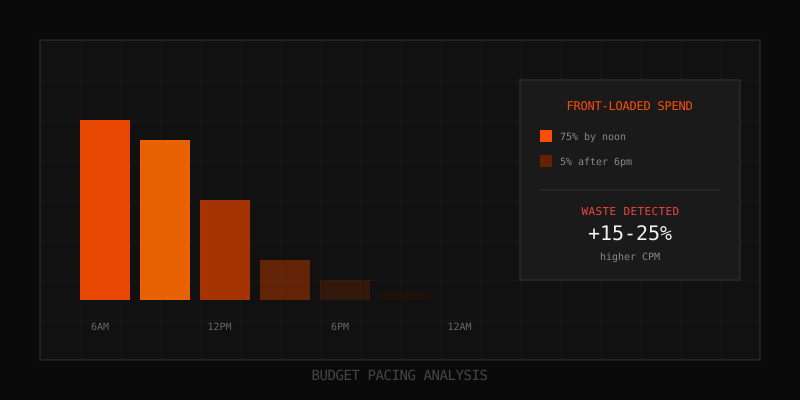
Your daily budget is just a number. What matters is when that money gets spent. Two ad sets with identical $100 daily budgets can have radically different outcomes - one spending evenly throughout the day at $4.17/hour, another burning through $80 by noon and trickling the remaining $20 through the afternoon. Same budget. Completely different results.
Budget pacing problems are among the most overlooked inefficiencies in Meta Ads accounts. They are invisible in daily summaries, hidden in aggregate metrics, and only reveal themselves when you look at hourly data. Yet they can cost you 10-30% in wasted spend by delivering ads at the wrong times to the wrong mindsets.
What Is Budget Pacing?
Budget pacing refers to how your daily or lifetime budget gets distributed across time. Meta algorithm decides when to show your ads within your budget constraints. Ideal pacing aligns spend with your best conversion opportunities. Poor pacing misaligns them.
Meta offers two pacing options:
- Standard delivery: Algorithm spreads budget throughout the day based on predicted outcomes
- Accelerated delivery: Spends as fast as possible (deprecated for most campaign types)
Even with standard delivery, pacing problems occur. The algorithm optimizes within its constraints, but those constraints may not match your best opportunities.
The Three Major Pacing Problems
Budget pacing issues manifest in three primary patterns. Each has different causes and solutions.
Problem 1: Front-Loaded Spend
Front-loaded spend occurs when 65%+ of your daily budget is consumed before noon. Your ads are invisible during peak evening hours when most consumer audiences are most active and receptive.
| Time Window | Healthy Pacing | Front-Loaded | Difference |
|---|---|---|---|
| 12am - 6am | 15% | 25% | +10% |
| 6am - 12pm | 25% | 45% | +20% |
| 12pm - 6pm | 30% | 20% | -10% |
| 6pm - 12am | 30% | 10% | -20% |
Why it happens:
- Lowest Cost bidding captures cheap morning impressions aggressively
- Budget resets at midnight, algorithm starts fresh each day
- Small budget relative to audience size
- Broad targeting with lots of early availability
The cost: Front-loaded spend typically results in 15-25% worse CPA compared to evenly paced campaigns. Morning users have different intent than evening users for most consumer products.
Problem 2: Back-Loaded Spend (Panic Spending)
Back-loaded spend occurs when the algorithm hoards budget during the day, then spends aggressively in the final hours. This often indicates the algorithm is struggling to find opportunities at your bid levels, then panics as budget deadline approaches.
| Time Window | Healthy Pacing | Back-Loaded | Difference |
|---|---|---|---|
| 12am - 6am | 15% | 5% | -10% |
| 6am - 12pm | 25% | 15% | -10% |
| 12pm - 6pm | 30% | 20% | -10% |
| 6pm - 12am | 30% | 60% | +30% |
Why it happens:
- Cost Cap or Bid Cap set too aggressively
- Narrow targeting limits available inventory
- High competition during preferred hours
- Algorithm waiting for better opportunities that never materialize
The cost: Back-loaded spend often means paying premium CPMs in the final hours as the algorithm bids more aggressively to exhaust budget. Quality of impressions may decline as selectivity drops.
Problem 3: Spiky Spend (Erratic Pacing)
Spiky spend shows no consistent pattern - high spend one hour, near-zero the next. This indicates instability in how the algorithm is finding and valuing opportunities.
| Hour | Healthy Pacing | Spiky Pattern |
|---|---|---|
| 9am | $4.17 | $12.50 |
| 10am | $4.17 | $0.80 |
| 11am | $4.17 | $15.20 |
| 12pm | $4.17 | $2.10 |
| 1pm | $4.17 | $0.00 |
| 2pm | $4.17 | $18.40 |
Why it happens:
- Learning phase instability
- Audience too narrow with inconsistent availability
- Bid strategy conflicts with available inventory
- Competition fluctuations
The cost: Spiky spend suggests the algorithm is not confidently finding good opportunities. This usually correlates with higher variance in CPA and less predictable results.
Diagnosing Pacing Problems
You cannot fix what you cannot see. Here is how to diagnose pacing issues:
Step 1: Export Hourly Data
In Ads Manager, export performance data with "Hour" breakdown. Include at least 7 days for reliable patterns. Required columns:
- Reporting date
- Hour
- Amount spent
- Impressions
- Results
- CPM
Step 2: Calculate Pacing Metrics
For each day, calculate:
- AM share: (Spend hours 0-11) / (Total daily spend) * 100
- Coefficient of variation: Standard deviation of hourly spend / Mean hourly spend
- Peak hour concentration: Spend in top 3 hours / Total daily spend
Step 3: Apply Diagnostic Thresholds
| Metric | Healthy Range | Warning | Problem |
|---|---|---|---|
| AM share | 40-55% | 55-65% or 35-40% | Above 65% or below 35% |
| Coefficient of variation | Below 0.5 | 0.5-0.8 | Above 0.8 |
| Peak hour concentration | Below 25% | 25-35% | Above 35% |
Step 4: Visualize the Pattern
Create a bar chart of hourly spend averaged across 7+ days. Visual inspection often reveals patterns that metrics miss. Look for:
- Steep drop-offs (budget exhaustion)
- Hour-over-hour spikes (erratic delivery)
- Flat periods (no delivery)
- Concentration in specific windows
Root Causes of Pacing Problems
Understanding why pacing problems occur helps you choose the right fix.
Cause 1: Bid Strategy Mismatch
Lowest Cost: Tells algorithm to get maximum results at any cost. Can lead to aggressive early spending when cheap impressions are available.
Cost Cap: Tells algorithm to stay below target CPA. Can lead to back-loaded spend if cap is too tight for market conditions.
Bid Cap: Sets maximum bid in auction. Very tight caps cause severe back-loading or underdelivery.
Cause 2: Budget-Audience Imbalance
When daily budget is small relative to audience size, the algorithm has limited ability to pace strategically. It may exhaust budget on the first available opportunities rather than waiting for optimal ones.
Rule of thumb: Daily budget should be at least 10x your expected CPA for stable pacing. Below this, pacing becomes erratic.
Cause 3: Competition Dynamics
If your competitors are more aggressive during certain hours, the algorithm may avoid those windows and concentrate spend elsewhere. This can create unexpected pacing patterns even with good settings.
Cause 4: Audience Availability
Some audiences are genuinely only active at certain times. B2B professionals are online during work hours. Gamers peak late night. The algorithm delivers when your audience is available, which may not align with your expectations.
Cause 5: Learning Phase
During learning phase, the algorithm experiments with delivery. Pacing is naturally less stable until approximately 50 conversions are achieved and the system exits learning phase.
Fixing Front-Loaded Spend
Front-loading is the most common pacing problem. Here are the fixes, from least to most disruptive:
Fix 1: Switch to Cost Cap Bidding
Cost Cap forces the algorithm to be selective. It will not chase cheap morning impressions if they do not meet your CPA target. This naturally spreads spend more evenly.
How to implement:
- Note your current average CPA
- Set Cost Cap at 100-110% of current CPA
- Monitor delivery for 3-5 days
- Adjust cap based on delivery volume
Fix 2: Implement Ad Scheduling
Ad scheduling (dayparting) lets you restrict delivery to specific hours. If your audience converts best from 10am-11pm, schedule ads for only those hours.
How to implement:
- Requires lifetime budget (not daily budget)
- In ad set settings, enable "Ad Scheduling"
- Select hours when ads should run
- Budget will only be spent during those windows
Caution: Scheduling reduces available inventory. Make sure your selected windows have enough volume to meet spend goals.
Fix 3: Use Lifetime Budget
Lifetime budgets give Meta more flexibility to pace across days and times. Combined with ad scheduling, this provides maximum control.
How to implement:
- Calculate total budget for campaign duration
- Set as lifetime budget instead of daily
- Add ad scheduling if desired
- Meta will optimize delivery across entire flight
Fix 4: Increase Budget
Sometimes front-loading happens because budget is too small for the algorithm to pace strategically. Increasing budget gives the algorithm room to be selective.
When to use: When budget is less than 10x expected CPA and audience is large.
Fixing Back-Loaded Spend
Back-loading indicates the algorithm is struggling to find opportunities at your constraints. Fixes focus on loosening constraints or expanding opportunities.
Fix 1: Relax Cost Cap or Bid Cap
If using Cost Cap or Bid Cap, your target may be too aggressive for market conditions. The algorithm waits for opportunities that rarely appear, then panic-spends at day end.
How to implement:
- Increase cap by 10-20%
- Monitor for improved pacing
- Balance CPA target vs. delivery volume
Fix 2: Expand Targeting
Narrow targeting limits available inventory. If the algorithm cannot find enough opportunities at your constraints, pacing suffers.
How to implement:
- Add interest layers
- Expand age range
- Add lookalike tiers
- Enable Advantage+ Audience if not already
Fix 3: Switch to Lowest Cost
If Cost Cap or Bid Cap is causing back-loading, switching to Lowest Cost removes the constraint. Pacing typically improves, though CPA may increase.
Fixing Spiky/Erratic Spend
Erratic pacing suggests fundamental issues with how the algorithm is finding opportunities.
Fix 1: Wait Out Learning Phase
If the ad set is in learning phase, erratic pacing is normal. Wait for approximately 50 conversions before diagnosing pacing problems. The algorithm is still experimenting.
Fix 2: Consolidate Ad Sets
Too many ad sets splitting budget leads to each one having erratic delivery. Consolidating into fewer, larger ad sets gives each one enough budget for stable pacing.
Rule of thumb: Each ad set should have budget for at least 5 conversions per day for stable pacing.
Fix 3: Simplify Structure
Complex campaign structures with many overlapping audiences create competition and instability. Simplifying to fewer, cleaner ad sets often improves pacing.
Pacing Optimization by Objective
Different campaign objectives have different pacing considerations:
E-commerce / Purchase Campaigns
Peak purchase times are typically 7pm-11pm for most consumer products. Front-loaded spend is especially costly because it misses prime buying hours.
Recommendation: Use Cost Cap bidding or ad scheduling to ensure evening delivery.
Lead Generation Campaigns
Lead quality often varies by time of day. Morning leads may be higher intent (at work, researching). Evening leads may be more casual.
Recommendation: Analyze lead quality by hour before optimizing pacing. The best time for volume may not be the best time for quality.
Awareness / Reach Campaigns
Pacing matters less for awareness campaigns where the goal is maximum reach. However, avoiding early morning (low engagement) and late night (low retention) is still valuable.
Recommendation: Standard delivery usually works fine. Consider scheduling to avoid 2am-6am window.
App Install Campaigns
App install intent varies by app category. Gaming apps may perform best late evening. Productivity apps may peak during commute times.
Recommendation: Analyze install quality by hour. Consider dayparting based on findings.
Monitoring Pacing Over Time
Pacing can shift as conditions change. Set up ongoing monitoring:
Weekly Pacing Check
- Export hourly data for past 7 days
- Calculate AM share and coefficient of variation
- Compare to previous week
- Flag any ad sets with degrading pacing
Alert Thresholds
- AM share change of more than 10 percentage points
- Coefficient of variation increase of more than 0.2
- Consistent zero-spend hours appearing
Correlation Analysis
Track pacing metrics alongside performance metrics. Often, pacing degradation precedes CPA increases. Catching pacing problems early can prevent performance decline.
Pacing in Advantage Campaign Budget (CBO)
When using Advantage Campaign Budget (CBO), pacing complexity increases because budget is distributed across ad sets dynamically.
CBO Pacing Challenges
- One ad set may front-load while others starve
- Budget shifts between ad sets create erratic patterns
- Hard to diagnose issues at ad set level
CBO Pacing Solutions
- Minimum spend limits: Set minimum daily spend per ad set to ensure even distribution
- Fewer ad sets: CBO works best with 3-5 ad sets, not 10+
- Similar audience sizes: Large variance in audience sizes causes uneven distribution
Key Takeaways
- Budget pacing determines when your money gets spent, which affects CPA by 10-30%
- Three main problems: front-loaded (burns early), back-loaded (panics late), spiky (erratic)
- Diagnose with hourly data exports and AM share / coefficient of variation metrics
- Front-loading fixes: Cost Cap bidding, ad scheduling, lifetime budget
- Back-loading fixes: relax bid constraints, expand targeting
- Spiky fixes: wait for learning phase, consolidate ad sets, simplify structure
- Monitor pacing weekly alongside performance metrics
FAQ
How do I know if my pacing is actually hurting performance?
Correlate pacing metrics with CPA by time period. If your CPA during high-spend hours is significantly worse than during low-spend hours, pacing is costing you. Also compare to accounts with similar objectives but better pacing - the CPA difference indicates opportunity.
Will fixing pacing reset my learning phase?
Changing bid strategy (e.g., Lowest Cost to Cost Cap) can reset learning phase. Implementing ad scheduling typically does not reset learning. Budget changes may reset learning if the change exceeds 20%. Plan for potential short-term instability when making pacing fixes.
Should I aim for perfectly even pacing?
Not necessarily. Perfectly even pacing ignores that some hours are better than others. The goal is intentional pacing that aligns with your best conversion opportunities, not mathematical evenness. If your audience converts best in evening, you want more evening spend.
How quickly can I see pacing improvements after making changes?
Pacing changes are visible within 24-48 hours after making adjustments. However, assess the impact on performance metrics (CPA, conversion rate) over 7+ days to account for day-of-week variations and algorithm stabilization.
Do pacing problems affect all ad accounts equally?
No. High-budget accounts have more room for the algorithm to optimize pacing. Low-budget accounts with broad targeting are most susceptible to pacing problems. B2B accounts often have natural pacing alignment with business hours. Consumer accounts targeting evening audiences are most affected by front-loading.
Learn more: How it works · Why bundles beat raw thread history