
Thread Transfer
Understanding Budget Caps: Spend Limits, Account Limits, and Pacing
Spend limits, account limits, campaign limits, ad set limits—Meta's budget controls layer on top of each other. Here's how they interact and when to use each.
Thread Transfer
Founder, Meta Ads Audit
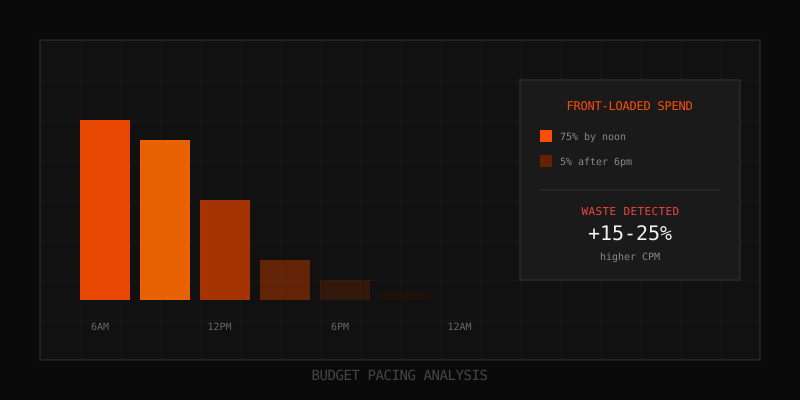
Meta gives you multiple levers to control ad spend: account spending limits, campaign budgets, ad set budgets, and spend limits. These controls interact in ways that aren't always obvious. Set them wrong and your ads stop delivering mid-day. Set them right and you have precise control over exactly how much you spend, when, and where.
This guide explains every budget control Meta offers, how they interact, and how to configure them for your specific goals.
The Budget Control Hierarchy
Meta's budget controls operate in a hierarchy. Higher-level limits override lower-level budgets:
- Account Spending Limit: Maximum total spend across all campaigns
- Campaign Budget: Maximum spend for a single campaign (daily or lifetime)
- Ad Set Budget: Maximum spend for a single ad set (if not using CBO)
- Bid Controls: Cost cap, bid cap, ROAS targets (per ad set)
Understanding this hierarchy is critical. An ad set with a $100 daily budget won't spend that if its campaign budget is exhausted, or if the account spending limit is reached.
Account Spending Limits
What It Is
The account spending limit is a hard cap on total spend across your entire ad account. Once reached, ALL ads in the account pause automatically.
How to Set It
- Go to Business Settings > Payment Settings
- Click Set Account Spending Limit
- Enter your maximum total spend
- Ads stop when this limit is reached
When to Use Account Spending Limits
| Scenario | Recommendation |
|---|---|
| New advertiser, testing budget | Set limit at 1.5x monthly budget |
| Agency managing client accounts | Set limit at contract maximum |
| Established advertiser, stable spend | Optional; campaign budgets may suffice |
| Worried about runaway spend | Set limit as safety net |
Common Issues
- Forgot to reset: Limit reached, ads paused, nobody noticed for days
- Too tight: Limit hit mid-month, campaigns disrupted during learning
- Not updated: Budget increased but limit wasn't, causing premature stops
Campaign Budgets: Daily vs Lifetime
Daily Budget
A daily budget tells Meta how much to spend each day, on average. Key points:
- Meta may spend up to 25% more on high-opportunity days
- Weekly spend will average out to daily budget x 7
- Provides predictable daily spend (within 25% variance)
- Spend resets every midnight in your account's time zone
Lifetime Budget
A lifetime budget tells Meta the total amount to spend over the campaign's entire run. Key points:
- Meta distributes spend across the campaign duration
- Unlocks ad scheduling (specific days/hours)
- Spend may vary significantly day-to-day
- Campaign must have an end date
Comparison
| Factor | Daily Budget | Lifetime Budget |
|---|---|---|
| Daily spend predictability | High (within 25%) | Low (varies significantly) |
| Ad scheduling | Not available | Available |
| End date required | No | Yes |
| Best for | Evergreen campaigns | Promotions, events, limited runs |
| Algorithm flexibility | Moderate | High |
Which to Choose
- Use Daily: When you need consistent daily spend, evergreen campaigns, or no end date
- Use Lifetime: When you need ad scheduling, have a fixed campaign period, or want to give the algorithm more flexibility
CBO vs ABO: Campaign Budget Optimization
Campaign Budget Optimization (CBO)
With CBO, you set the budget at the campaign level. Meta automatically distributes spend across ad sets based on performance.
- Budget is set once for the entire campaign
- Meta allocates more to high-performing ad sets
- You can set minimum/maximum spend limits per ad set
- Less control, more algorithm leverage
Ad Set Budget Optimization (ABO)
With ABO, you set budgets at the ad set level. Each ad set gets its specified budget regardless of relative performance.
- Budget is set individually for each ad set
- Each ad set spends its allocation (if possible)
- More control over spend distribution
- Useful for structured testing
When to Use Each
| Scenario | Recommended | Why |
|---|---|---|
| Similar audiences, let algorithm decide | CBO | Algorithm finds best performers automatically |
| A/B testing with equal spend | ABO | Ensures each variation gets same budget |
| Different funnel stages | CBO with minimums | Ensures each stage gets some spend |
| Small budget (under $50/day) | CBO | Concentrates budget for faster learning |
| Large budget, many ad sets | CBO | Reduces manual allocation burden |
Ad Set Spend Limits (with CBO)
When using CBO, you can set minimum and maximum spend limits per ad set:
Minimum Spend
Forces the algorithm to spend at least this amount on the ad set daily, even if other ad sets are outperforming it.
- Use when you need guaranteed spend on specific audiences
- Common for brand campaigns that must reach certain segments
- Be careful: forces spend on potentially underperforming ad sets
Maximum Spend
Caps the algorithm's ability to allocate budget to this ad set, even if it's outperforming.
- Use when an audience has limited scale potential
- Prevents over-concentration in small audiences
- Be careful: may leave profitable opportunities on the table
Recommended Approach
- Start without minimums/maximums; let the algorithm allocate freely
- Add minimums only if critical ad sets are getting starved
- Add maximums only if ad sets are exhausting small audiences
- Keep limits loose (10-30% of campaign budget per ad set) to preserve flexibility
Bid Controls and Budget Interaction
Bid controls (cost cap, bid cap, ROAS target) interact with budgets to determine actual spend:
Cost Cap
Sets a target cost per result. Meta tries to get results at or below this cost.
- Budget impact: May underdeliver if target is too aggressive
- Risk: Setting cost cap too low can prevent budget from spending
- Best practice: Set cost cap at 1.2-1.5x your actual target initially
Bid Cap
Sets a hard maximum you'll pay per auction. Meta won't bid above this amount.
- Budget impact: Will underdeliver if bid is too low for the auction
- Risk: May miss opportunities where slightly higher bids would be profitable
- Best practice: Only use with significant historical data to guide bid levels
ROAS Target
Sets a minimum return on ad spend target. Meta optimizes for purchases that meet this threshold.
- Budget impact: May underdeliver if ROAS target is unrealistically high
- Risk: Algorithm may prioritize cheap conversions over total value
- Best practice: Set ROAS target 20-30% below your actual required ROAS
Budget Pacing: Standard vs Accelerated
Standard Pacing (Default)
Meta distributes your budget evenly throughout the day, optimizing for efficiency.
- Spend is paced to last the full day
- Algorithm waits for optimal opportunities
- May not spend full budget if opportunities are limited
- Best for most advertisers
Accelerated Pacing (Discontinued for Most)
Meta used to offer accelerated pacing, which spent budget as fast as possible. This is now largely deprecated except in specific scenarios (some auction objectives).
If you need faster spend, increase your budget rather than trying to accelerate pacing.
Common Budget Configuration Mistakes
Mistake 1: Budget Conflicts
Setting an account limit lower than your campaign budgets, or campaign budget lower than ad set minimums. Result: ads underdeliver or stop unexpectedly.
Fix: Audit your budget hierarchy. Account limit > sum of campaign budgets > sum of ad set minimums (if using CBO with minimums).
Mistake 2: Too Many Ad Sets with Small Budget
Splitting $100/day across 10 ad sets = $10/ad set = insufficient data for any to optimize properly.
Fix: Consolidate ad sets. Each should have at least $20-30/day for meaningful learning.
Mistake 3: Aggressive Cost Caps with Large Budgets
Setting a $30 cost cap with a $1,000 daily budget when historical CPA is $40. Budget can't spend.
Fix: Set cost caps based on historical data, not aspirational targets. Start at 1.2-1.5x current CPA and tighten gradually.
Mistake 4: Not Monitoring Delivery
Budgets look right on paper, but delivery is constrained by bid caps, audience size, or ad quality.
Fix: Check the "Delivery" column regularly. "Learning Limited" or "Active (Limited by Budget)" signals misconfiguration.
Mistake 5: Daily Budget Too Low for Objective
Setting a $10 daily budget on a conversion campaign where CPA is $50. You'd need 5 days just for one conversion.
Fix: Budget should be at least 5-10x your expected CPA for the algorithm to learn efficiently.
Budget Configuration Checklist
Before launching campaigns, verify:
- Account spending limit: Is it high enough for planned spend? (Or removed if not needed)
- Campaign budget: At least 5-10x expected CPA per day?
- Ad set allocation: Each ad set getting $20+/day if using ABO?
- CBO minimums: Total minimums don't exceed 70% of campaign budget?
- Bid controls: Set based on actual data, not aspirational targets?
- Lifetime budget end date: Correctly set if using lifetime budgets?
Key Takeaways
- Budget controls operate in a hierarchy: account > campaign > ad set > bid controls
- Account spending limits are safety nets; set them 20-50% above planned spend
- Daily budgets provide predictability; lifetime budgets provide flexibility and scheduling
- CBO concentrates budget on winners; ABO gives equal distribution for testing
- Bid controls can cause underspend if set too aggressively
- Each ad set needs sufficient budget ($20+/day) for meaningful optimization
FAQ
Why is my budget underspending every day?
Common causes: (1) Cost cap or bid cap too restrictive, (2) Audience too small, (3) Ad quality too low to win auctions, (4) Account spending limit reached. Check delivery status in Ads Manager for specific diagnosis.
Can I change from daily to lifetime budget on an active campaign?
No. Budget type cannot be changed after a campaign is created. You must duplicate the campaign with the new budget type.
How do CBO minimum spend limits affect learning phase?
Each ad set with a minimum still needs to exit learning independently. If the minimum is too low for the ad set to get 50 conversions/week, it may stay in "Learning Limited" despite guaranteed spend.
Should I use account spending limits as an agency?
Yes, always. Set limits at the contracted maximum to prevent overspend liability. Review and reset monthly as contracts renew.
What happens when I reach my account spending limit?
All ads in the account pause immediately. They remain paused until you either increase the limit or reset it. No notification is sent by default—set up alerts to avoid surprises.
Learn more: How it works · Why bundles beat raw thread history