
Thread Transfer
Automating Budget Optimization: Rules, Scripts, and Third-Party Tools
Checking budgets daily doesn't scale past 10 campaigns. Here's how to automate budget optimization with rules, scripts, and tools that react faster than you can.
Thread Transfer
Founder, Meta Ads Audit
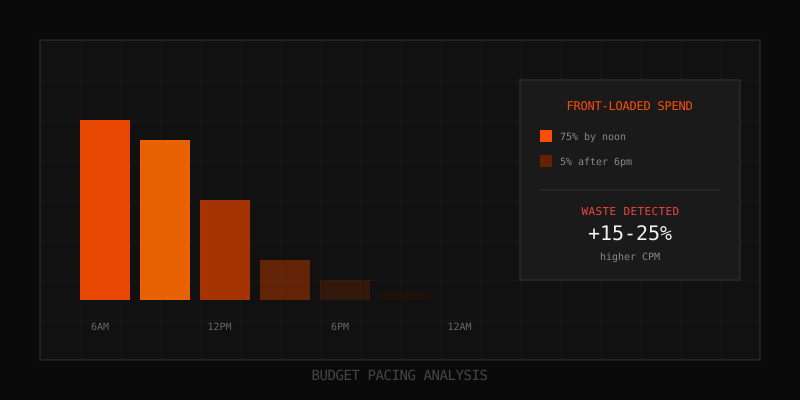
You're managing 20 campaigns across 3 accounts. Checking budgets daily takes 2 hours. Reacting to performance changes takes another hour. By the time you notice an ad set overspending on poor results, you've already wasted hundreds of dollars.
Manual budget management doesn't scale. The solution: automation that monitors, alerts, and acts faster than you can. This guide covers Meta's built-in automated rules, custom API scripts, and third-party tools that can transform budget optimization from a daily chore into a set-and-forget system.
The Case for Budget Automation
Before diving into how, let's establish why automation matters:
Speed Advantage
- Rules can check performance every 30 minutes; you check once or twice daily
- Automatic pauses trigger immediately when thresholds are breached
- Budget shifts happen at 3 AM when CPAs spike, not at 9 AM when you notice
Consistency Advantage
- Rules apply the same logic every time—no emotional decisions
- Every ad set is monitored equally; nothing slips through cracks
- Decisions are documented and auditable
Scale Advantage
- 100 ad sets monitored as easily as 10
- Multiple accounts managed from a single rule set
- Your time shifts from monitoring to strategy
Meta's Built-In Automated Rules
Meta Ads Manager includes a free automated rules feature that handles most common budget automation needs.
How to Access
- Go to Ads Manager
- Click "Rules" in the left menu (or use the three-dot menu on any campaign/ad set)
- Click "Create New Rule"
Rule Components
- Apply to: All active campaigns, specific campaigns, ad sets, or ads
- Conditions: Performance thresholds that trigger the rule
- Action: What happens when conditions are met
- Time range: The lookback window for metrics (Today, Last 3 days, Last 7 days, etc.)
- Schedule: How often the rule checks (30 minutes, hourly, daily, etc.)
Available Actions
| Action | Description | Use Case |
|---|---|---|
| Turn off | Pauses the campaign/ad set/ad | Kill underperformers automatically |
| Turn on | Activates paused items | Re-enable during specific windows |
| Increase budget by | Raises budget by % or fixed amount | Scale winners automatically |
| Decrease budget by | Lowers budget by % or fixed amount | Pull back from underperformers |
| Notification only | Sends email/Ads Manager notification | Alert for manual review |
Essential Budget Rules to Implement
These rules cover 80% of budget optimization needs for most advertisers:
Rule 1: Pause High-CPA Ad Sets
- Apply to: All active ad sets
- Condition: Cost per result is greater than $X (2x your target CPA)
- AND: Results (conversions) is greater than 10 (ensures statistical significance)
- Time range: Last 7 days
- Action: Turn off ad set
- Schedule: Daily
Why it works: Catches sustained underperformance before it drains more budget. The 10+ conversion requirement prevents premature pausing.
Rule 2: Scale Winners Gradually
- Apply to: All active ad sets
- Condition: Cost per result is less than $X (0.8x your target CPA)
- AND: Results is greater than 20
- AND: ROAS is greater than Y (your minimum acceptable ROAS)
- Time range: Last 7 days
- Action: Increase daily budget by 20%
- Max budget: $Z (set a cap to prevent runaway scaling)
- Schedule: Daily
Why it works: Automatically allocates more budget to proven performers without triggering learning phase (20% increases stay under the 30% threshold).
Rule 3: Alert on Budget Underspend
- Apply to: All active campaigns
- Condition: Amount spent (today) is less than 50% of daily budget
- AND: Time of day is after 6 PM (campaign has had time to spend)
- Time range: Today
- Action: Notification only
- Schedule: Once daily at 6 PM
Why it works: Catches delivery issues (tight cost caps, small audiences, ad rejections) before the full day is wasted.
Rule 4: Prevent Budget Overconcentration
- Apply to: All active ad sets
- Condition: Amount spent (today) is greater than $X (your max acceptable daily ad set spend)
- AND: Cost per result is greater than target CPA
- Time range: Today
- Action: Turn off ad set
- Schedule: Every 30 minutes
Why it works: With CBO, a single ad set can absorb most of the budget. This prevents overspend on ad sets that are getting volume but at poor efficiency.
Rule 5: Frequency Cap Protection
- Apply to: All active ad sets
- Condition: Frequency is greater than 5
- AND: CTR is less than 1%
- Time range: Last 7 days
- Action: Turn off ad set
- Schedule: Daily
Why it works: High frequency with low CTR signals audience fatigue. The ad is being shown repeatedly to people who don't want to click.
Advanced Rule Strategies
Dayparting Budget Shifts
If you know certain hours convert better, create rules to shift budget:
- Rule A: At 8 AM, increase budgets by 50% on campaigns targeting working professionals
- Rule B: At 10 PM, decrease those same budgets by 33% (returns to original)
This requires scheduling rules to run once daily at specific times.
Weekend/Weekday Adjustments
- Rule A: On Saturday, increase e-commerce campaign budgets by 30%
- Rule B: On Monday, decrease those budgets by 23% (returns to original)
Useful for B2C brands where weekend shopping behavior differs from weekdays.
Conditional Scaling with Multiple Triggers
Combine multiple conditions for smarter decisions:
- Scale only if: CPA is below target AND ROAS is above minimum AND frequency is below 4 AND the ad set has 20+ conversions
This prevents scaling ad sets that look good on one metric but are problematic on others.
Custom Scripts via Meta Marketing API
For more complex automation, Meta's Marketing API allows custom scripts that can:
- Pull performance data programmatically
- Apply complex logic (machine learning models, multi-account comparisons)
- Make bulk changes across hundreds of ad sets
- Integrate with external data sources (inventory, CRM, weather)
Common Custom Script Use Cases
| Use Case | What the Script Does |
|---|---|
| Inventory-aware budgeting | Pauses ads for out-of-stock products, scales in-stock winners |
| Weather-triggered budgets | Increases umbrella ad budgets when rain is forecast |
| Competitive monitoring | Alerts when competitor impression share changes significantly |
| Cross-account optimization | Balances budgets across multiple accounts toward overall ROAS goal |
| Predictive scaling | Uses ML to predict which ad sets will perform well and pre-scales them |
Technical Requirements
- Meta Business account with API access
- Developer capable of Python, JavaScript, or PHP
- Server/hosting for scheduled script execution (AWS Lambda, Google Cloud Functions, etc.)
- Understanding of rate limits and API best practices
Third-Party Budget Optimization Tools
If you don't want to build custom scripts, third-party tools offer pre-built automation:
Category: Rule Builders
Tools that extend Meta's native rules with more conditions and actions:
- Revealbot: Advanced rules with cross-campaign logic, Slack alerts, bulk templates
- Madgicx: AI-powered automation with creative and audience suggestions
- Smartly.io: Enterprise-grade automation with predictive budget allocation
Category: Portfolio Bidding
Tools that optimize budget allocation across your entire account like a single portfolio:
- Perpetua: E-commerce focused with automatic bid and budget management
- Skai (formerly Kenshoo): Cross-channel portfolio optimization
- Marin Software: Large-scale bid and budget management
Category: AI/ML Optimization
Tools that use machine learning to predict performance and optimize proactively:
- Albert AI: Fully autonomous campaign management
- Adzooma: AI recommendations with one-click implementation
- Optmyzr: Rule-based and ML-driven optimization combined
Evaluation Criteria
| Factor | Questions to Ask |
|---|---|
| Integration depth | Does it access all Meta APIs? Real-time or delayed data? |
| Rule flexibility | Can you create custom conditions? Multi-condition logic? |
| Safeguards | Are there budget caps, approval workflows, rollback options? |
| Reporting | Can you see what the tool changed and why? |
| Pricing model | Flat fee, % of spend, or performance-based? |
Automation Safety Guardrails
Automation can go wrong. Implement these safeguards:
Budget Caps
Every scaling rule should have a maximum budget cap. Without it, a rule could keep increasing budget until you've spent your entire monthly allocation in a day.
Change Limits
Limit how much any single rule execution can change:
- Budget increases: max 20% per day
- Budget decreases: max 30% per day
- Pauses: require notification before bulk pauses
Notification Requirements
For critical actions (pauses, budget decreases above $100), require email/Slack notification so you're aware of changes made.
Review Windows
Set rules to only run during business hours initially. This gives you time to catch issues before they compound overnight.
Kill Switch
Have a master "pause all automation" toggle you can flip if rules start behaving unexpectedly.
Automation Implementation Roadmap
Start simple and add complexity gradually:
Phase 1: Monitoring (Week 1-2)
- Create notification-only rules for all scenarios
- Track what the rules would have done
- Validate that thresholds are correct
Phase 2: Conservative Actions (Week 3-4)
- Enable pause rules for clear underperformers (2x+ CPA)
- Enable small budget decreases (10% for poor performers)
- Keep scaling rules as notification-only
Phase 3: Scaling Rules (Week 5-6)
- Enable 20% budget increases for winners
- Set conservative max budget caps
- Monitor for learning phase issues
Phase 4: Optimization (Ongoing)
- Analyze rule performance monthly
- Adjust thresholds based on outcomes
- Add new rules for edge cases discovered
Measuring Automation ROI
Track whether automation is actually helping:
Metrics to Compare
- Time saved: Hours per week on manual budget management
- Response time: How quickly do you now catch underperformers?
- Waste reduction: Spend on ad sets above 2x CPA before vs after
- Scale efficiency: Did automated scaling maintain ROAS?
- Error rate: How often did rules make wrong decisions?
Expected Outcomes
| Metric | Typical Improvement |
|---|---|
| Time on budget management | 50-70% reduction |
| Waste on underperformers | 30-50% reduction |
| Speed to scale winners | 2-5x faster |
| Overall ROAS | 5-15% improvement |
Key Takeaways
- Automation enables faster, more consistent budget optimization than manual management
- Meta's built-in rules handle 80% of needs for free
- Essential rules: pause high-CPA, scale winners, alert on underspend, prevent frequency fatigue
- Custom scripts via API enable advanced use cases (inventory sync, weather triggers)
- Third-party tools add AI/ML optimization and cross-account management
- Always implement safety guardrails: budget caps, change limits, notifications
- Start with notification-only rules, then graduate to actions after validation
FAQ
Can automated rules hurt my campaign performance?
Yes, if configured poorly. Rules with aggressive thresholds might pause promising ad sets too early, or scale underperformers before seeing full data. Start conservatively and tighten thresholds as you learn.
How many rules should I have per account?
Start with 3-5 core rules (pause underperformers, scale winners, alert on issues). Add more only when you identify specific gaps. Too many rules can conflict with each other.
Do automated rules affect learning phase?
Budget changes above 20-30% can reset learning. Design scaling rules to stay under this threshold (e.g., 20% increases). Pausing and unpausing can also reset learning—be cautious with on/off rules.
Should I use Meta's rules or a third-party tool?
Start with Meta's free rules. Upgrade to third-party only if you need: cross-account optimization, more complex conditions, better reporting, or AI-driven recommendations. Most advertisers never outgrow Meta's native rules.
Can I automate creative testing budgets?
Yes. Create rules that graduate winning creatives to higher budgets and pause underperformers after sufficient impressions. Common threshold: pause ads with CTR below 0.5% after 5,000 impressions; scale ads with CTR above 1.5% and positive conversion metrics.
Learn more: How it works · Why bundles beat raw thread history