
Thread Transfer
Lookalike Audiences: 1% vs 5% vs 10% (With Real Test Data)
1% lookalikes are highest quality but smallest reach. 10% lookalikes reach millions but dilute signal. Here's the data on which size wins for your use case.
Thread Transfer
Founder, Meta Ads Audit
Lookalike audiences are Meta's answer to the question: "Find me more people like my best customers." You provide a source audience—purchasers, high-value customers, engaged users—and Meta's algorithm finds similar users across their 3+ billion user base. Simple concept, complex execution.
The critical decision is audience size. A 1% lookalike in the US contains roughly 2.6 million people. A 10% lookalike contains 26 million. Bigger means more reach. But bigger also means diluted similarity. At some point, "similar" becomes "vaguely adjacent." Understanding where that point lies for your business determines whether lookalikes drive growth or waste budget.
How Lookalike Audiences Work
Meta analyzes your source audience to identify common patterns: demographics, interests, behaviors, app usage, purchase patterns, and thousands of other signals. The algorithm then finds users who share those patterns but aren't in your source audience.
The Similarity Spectrum
Lookalike percentages represent the top X% of users most similar to your source. A 1% lookalike includes only the closest matches. A 10% lookalike includes those closest matches plus progressively less similar users.
| Lookalike Size | US Audience (approx) | Similarity Level | Typical Use Case |
|---|---|---|---|
| 1% | 2.6M users | Highest | High-value prospecting, limited budget |
| 2% | 5.2M users | Very high | Balanced quality and reach |
| 3% | 7.8M users | High | Scaling with maintained quality |
| 5% | 13M users | Moderate | Broad prospecting, moderate CPA tolerance |
| 10% | 26M users | Lower | Maximum reach, brand awareness |
Source Audience Quality Matters
Garbage in, garbage out. A lookalike based on all website visitors includes everyone from bounce visitors to repeat purchasers. The algorithm can't distinguish high-intent from low-intent within a messy source. Better sources create better lookalikes:
- High-LTV purchasers: Best for finding quality customers
- Repeat purchasers: Signals strong brand affinity
- High-value cart completers: Intent + value combined
- Engaged email subscribers: Active interest, not just curiosity
- Video completers (75%+): Strong engagement signal
Avoid sources like all website visitors, all page likes, or bounced users. These dilute signal and create lookalikes that look like everyone—which means they look like no one in particular.
Real Test Data: 1% vs 5% vs 10%
We analyzed performance data across multiple verticals and spend levels. Here's what the numbers show:
E-commerce (Fashion): $50K Monthly Spend
| Lookalike Size | CPA | ROAS | Conversion Rate | Spend Share |
|---|---|---|---|---|
| 1% LAL | $18.40 | 4.2x | 2.8% | 35% |
| 3% LAL | $22.10 | 3.5x | 2.3% | 40% |
| 5% LAL | $28.50 | 2.7x | 1.7% | 20% |
| 10% LAL | $41.20 | 1.9x | 1.1% | 5% |
Finding: The 1% lookalike delivered 2.2x better ROAS than the 10%. But it couldn't absorb the full budget—spend naturally shifted to 3% as the 1% saturated.
B2B SaaS (Lead Gen): $30K Monthly Spend
| Lookalike Size | Cost Per Lead | Lead Quality Score | SQL Rate |
|---|---|---|---|
| 1% LAL | $42 | 8.2/10 | 24% |
| 3% LAL | $38 | 7.1/10 | 18% |
| 5% LAL | $35 | 5.8/10 | 12% |
| 10% LAL | $31 | 4.2/10 | 7% |
Finding: Cost per lead decreased as lookalike size increased—but lead quality dropped faster. When accounting for SQL rate, the 1% lookalike produced SQLs at $175 each, while the 10% produced them at $443 each. Cheaper leads, worse outcomes.
Consumer App (Install): $100K Monthly Spend
| Lookalike Size | CPI | Day-7 Retention | Day-30 LTV |
|---|---|---|---|
| 1% LAL | $2.80 | 38% | $4.20 |
| 3% LAL | $2.20 | 31% | $3.40 |
| 5% LAL | $1.70 | 24% | $2.60 |
| 10% LAL | $1.30 | 18% | $1.80 |
Finding: The 10% lookalike had the cheapest installs but the lowest retention and LTV. When measuring ROI (LTV/CPI), the 1% lookalike returned $1.50 per $1 spent, while the 10% returned $1.38. Smaller lookalike, better economics.
The Optimal Size by Objective
For Efficiency (CPA/ROAS Focus)
Recommended: 1-3% lookalikes
When every dollar needs to work hard, smaller lookalikes win. The similarity signal is strongest, conversion rates are highest, and CPA is lowest. The tradeoff is reach—you may exhaust the audience faster.
Strategy: Start with 1%. If delivery slows or frequency exceeds 2-3x weekly, expand to 2-3%. Use budget caps to control spend while maintaining efficiency.
For Scale (Volume Focus)
Recommended: 3-5% lookalikes
When you need more conversions and can tolerate moderate CPA increases, mid-range lookalikes balance quality and reach. The 3% lookalike in our tests typically delivered 80% of the efficiency of 1% while offering 3x the reach.
Strategy: Layer 3-5% lookalikes as expansion audiences. Exclude the 1% lookalike to prevent overlap and ensure clean testing.
For Brand Awareness (Reach Focus)
Recommended: 5-10% lookalikes
When the goal is impressions and reach rather than direct conversion, larger lookalikes make sense. You're still targeting people directionally similar to your customers—just not the closest matches.
Strategy: Use 10% lookalikes for top-of-funnel video campaigns or brand awareness objectives. Don't expect strong direct-response metrics; measure reach, frequency, and brand lift instead.
Segmented Lookalikes: The Overlap Solution
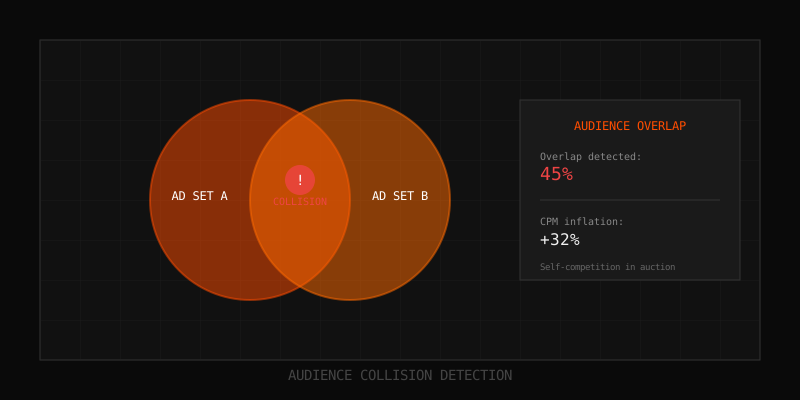
A 5% lookalike contains everyone in the 1% lookalike—plus 4% more users. Running both simultaneously causes audience overlap, self-competition, and polluted data. Segmented lookalikes solve this.
How to Create Segmented Lookalikes
Instead of running overlapping lookalikes, create mutually exclusive segments:
- 0-1%: Highest similarity (standard 1% lookalike)
- 1-3%: Users in top 3% excluding top 1%
- 3-5%: Users in top 5% excluding top 3%
- 5-10%: Users in top 10% excluding top 5%
How to set up: Create each lookalike at the broader size, then add the smaller lookalike as an exclusion. For 1-3%, create a 3% lookalike and exclude the 1% lookalike audience.
Why Segments Work Better
Segmented lookalikes let you:
- Test which similarity levels perform best for your business
- Allocate budget intentionally to each segment
- Avoid self-competition in auctions
- Get clean performance data per segment
- Scale by adding segments rather than expanding existing ones
Source Audience Best Practices
Minimum Source Size
Meta recommends at least 1,000 people in your source audience for reliable lookalike creation. In practice, we see better results with 2,000-5,000+ source users. Larger sources give the algorithm more patterns to learn from.
Exception: A small source of very high-quality users (100 top customers) can outperform a large source of mixed quality (10,000 random website visitors).
Source Quality Hierarchy
| Source Type | Quality | Best For |
|---|---|---|
| Top 10% LTV customers | Excellent | High-value prospecting |
| Repeat purchasers | Excellent | Finding loyal customers |
| All purchasers | Good | General prospecting |
| High-intent actions (ATC, checkout) | Good | Finding bottom-funnel prospects |
| Video completers (75%+) | Good | Engagement-based prospecting |
| Page engagers | Moderate | Broad awareness expansion |
| All website visitors | Poor | Avoid for lookalikes |
| Page likes | Poor | Avoid for lookalikes |
Value-Based Lookalikes
If you're sending purchase value data to Meta (via pixel or CAPI), you can create value-based lookalikes. Instead of finding users similar to all purchasers, Meta finds users similar to your highest-value purchasers specifically.
Setup: When creating the lookalike, select a custom audience that includes value data (like a customer list with LTV or a pixel audience with purchase values). Meta will optimize for value similarity, not just behavioral similarity.
Country and Location Considerations
Single-Country Lookalikes
A 1% lookalike in the US means the top 1% of similar US users. In Germany, it means the top 1% of similar German users. The percentage is relative to each country's Facebook user base.
| Country | 1% Lookalike Size (approx) |
|---|---|
| United States | 2.6M |
| United Kingdom | 450K |
| Germany | 350K |
| India | 4.5M |
| Brazil | 1.4M |
Multi-Country Lookalikes
You can create lookalikes targeting multiple countries. Meta finds the top X% in each country combined. This works well when your product appeals similarly across markets. It works poorly when buyer behavior differs significantly by country.
Recommendation: For high-spend accounts, create separate lookalikes per major market. This lets you optimize bids and budgets per region and see clean performance data.
Lookalike Refresh Strategy
Lookalike audiences are dynamic—Meta updates them as your source audience changes and as user behavior evolves. But the underlying source audience may need manual refreshing.
When to Refresh Sources
- Customer lists: Re-upload monthly with new customers and updated LTV data
- Pixel audiences: Typically self-refreshing, but verify time windows are appropriate
- Video/engagement audiences: Self-refreshing as new engagements occur
Signs Your Lookalike Needs Refreshing
- Performance degradation over 4-6 weeks without other changes
- Frequency climbing while reach stagnates
- CPA creeping up despite stable auction dynamics
- Source audience significantly different from when lookalike was created
Common Lookalike Mistakes
Mistake 1: Using All Website Visitors as Source
"All visitors" includes bounces, accidental clicks, and competitor researchers. The signal is diluted beyond usefulness. Use conversion-based or engagement-based sources instead.
Mistake 2: Running Overlapping Lookalikes Simultaneously
A 1% and 5% lookalike compete in the same auctions. Use segmented lookalikes (1%, 1-3%, 3-5%) to prevent overlap and self-competition.
Mistake 3: Jumping Straight to 10%
Starting with 10% dilutes signal before you've learned what works. Start small (1-2%), validate performance, then expand systematically.
Mistake 4: Ignoring Source Quality
A lookalike from low-quality sources finds more low-quality users. Invest time in building high-quality source audiences before scaling lookalikes.
Mistake 5: Never Refreshing Customer Lists
A customer list from 12 months ago reflects who your customers were, not who they are. Regular updates keep lookalikes current.
Key Takeaways
- 1-3% lookalikes deliver highest efficiency; 5-10% deliver maximum reach at efficiency cost
- Source quality matters more than source size—high-LTV customers beat all visitors
- Use segmented lookalikes (0-1%, 1-3%, 3-5%) to avoid overlap and get clean data
- Value-based lookalikes find high-value prospects, not just similar ones
- B2B lead gen showed 2.5x better SQL cost on 1% vs 10% lookalikes
- E-commerce showed 2.2x better ROAS on 1% vs 10% lookalikes
- Start small, validate, then expand—don't jump to 10% without testing smaller sizes
FAQ
Is 1% always better than larger lookalikes?
For efficiency, usually yes. For scale, no. The 1% lookalike is highest quality but limited in size. If you need to spend $100k/month, you'll likely need to expand beyond 1% to maintain delivery. The right size depends on your budget, goals, and tolerance for CPA variance.
How often should I update my lookalike source audiences?
Customer lists should be re-uploaded monthly. Pixel-based and engagement-based audiences update automatically as new actions occur. If your business or customer base changes significantly (new product lines, different market), consider creating fresh lookalikes from updated sources.
Can I use the same source audience for different lookalike sizes?
Yes, and you should. Create 1%, 3%, 5%, and 10% lookalikes from the same high-quality source. Then segment them (exclude smaller from larger) to run clean tests and determine optimal size for your business.
Do lookalikes still work after iOS 14.5?
Yes, but with caveats. Pixel-based sources lost signal, so lookalikes based on website visitors or app events are weaker. Customer list-based lookalikes retained effectiveness since they don't rely on pixel tracking. Shift toward first-party data sources for best results.
Should I use Advantage+ Audience instead of lookalikes?
They're not mutually exclusive. Advantage+ Audience can use your lookalikes as targeting suggestions while expanding beyond them. For strict control, use lookalikes directly. For maximum algorithm flexibility, use Advantage+ with lookalikes as suggestions. Test both approaches.
Learn more: How it works · Why bundles beat raw thread history