
Thread Transfer
Audience Exclusions: The Often-Ignored Key to Better ROAS
You're showing ads to people who just bought, competitors researching you, and the same users across 5 ad sets. Exclusions fix all three.
Thread Transfer
Founder, Meta Ads Audit
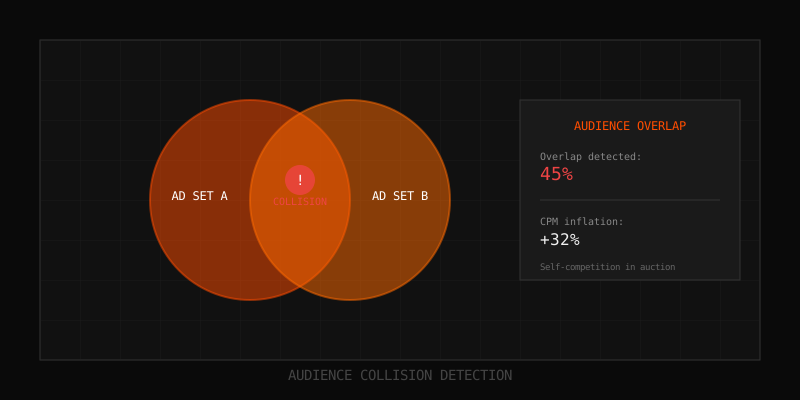
Audience targeting gets all the attention. Advertisers obsess over finding the right interests, building the perfect lookalike, crafting the ideal custom audience. But they ignore exclusions—the audiences you deliberately don't show ads to. This oversight costs real money.
Without exclusions, you show ads to recent purchasers who don't need convincing, competitors researching your strategy, current customers when you're trying to acquire new ones, and the same users across multiple overlapping ad sets. Each wasted impression is budget that could have reached a potential customer. Proper exclusion strategy typically improves ROAS by 15-30%.
Why Exclusions Matter More Than You Think
The Math of Wasted Impressions
Consider a typical e-commerce campaign spending $10,000/month. Without exclusions:
- 5% of impressions go to recent purchasers (unlikely to repurchase immediately): $500 wasted
- 10% of impressions go to overlapping audiences (same user, different ad sets): $1,000 inflated costs
- 3% of impressions go to competitors and irrelevant traffic: $300 wasted
- 2% of impressions go to users who bounced repeatedly: $200 wasted
That's $2,000/month—20% of budget—on low-probability or zero-probability conversions. Scale this to $100k monthly spend and you're burning $20,000 on exclusion-preventable waste.
Exclusions Improve Audience Quality
Beyond waste prevention, exclusions improve your targeting signal. When you exclude users who won't convert, Meta's algorithm learns from a cleaner dataset. The remaining audience contains higher-intent users, which improves the algorithm's optimization signals and helps it find more users like your best converters.
Essential Exclusion Categories
1. Recent Purchaser Exclusions
The most obvious exclusion: don't show acquisition ads to people who just bought. They don't need convincing—and showing them more ads annoys them while wasting budget.
Standard approach:
- Exclude purchasers from the last 7-30 days from all prospecting campaigns
- Adjust window based on your repurchase cycle (skincare: 60-90 days; fashion: 30 days; consumables: 14 days)
- Create the exclusion from your pixel's Purchase event or from customer list uploads
Common mistake: Using a 180-day exclusion window when your repurchase cycle is 30 days. You end up excluding users who are ready to buy again. Match exclusion window to your actual customer behavior.
2. Current Customer Exclusions
If your campaign objective is customer acquisition, exclude all existing customers—not just recent ones. Your acquisition budget should find new customers, not serve ads to people already in your database.
Implementation:
- Create a custom audience from your full customer list (email upload)
- Exclude this audience from all prospecting and acquisition campaigns
- Update the list monthly to include new customers
Exception: Reactivation campaigns deliberately target lapsed customers. Don't exclude customers from these campaigns—they're the target audience.
3. Overlap Prevention Exclusions
When you run multiple ad sets targeting similar audiences, they compete in the same auctions. Exclusions create clean separation:
| Ad Set Targeting | Exclusion | Result |
|---|---|---|
| Lookalike 3% | Lookalike 1% | Only shows to 1-3% segment |
| Lookalike 5% | Lookalike 3% | Only shows to 3-5% segment |
| Interest: Running | Custom Audience: Marathon Enthusiasts | Prevents double-targeting |
| Website Visitors (180 days) | Website Visitors (30 days) | Separates recent vs older visitors |
4. Funnel Stage Exclusions
Users at different funnel stages need different messaging. Exclusions ensure they see the right ad:
- Top-of-funnel (awareness): Exclude website visitors, engagers, and all customers
- Middle-of-funnel (consideration): Exclude cart abandoners and purchasers
- Bottom-of-funnel (conversion): Exclude recent purchasers only
This ensures a prospect sees brand awareness content first, then consideration content after visiting your site, then conversion content after adding to cart—never the wrong message for their stage.
5. Engagement-Based Exclusions
Not all engagement is good. Some users interact with your content but will never convert. Identify and exclude them:
- High-frequency non-converters: Users who've seen your ads 10+ times without converting
- Serial clickers: Users who click but never complete any action (may be bots or competitors)
- Repeat bouncers: Users who've visited your site 3+ times but always bounced immediately
Create these exclusions with custom audiences based on pixel events and engagement thresholds. They filter out users who consume budget without converting.
6. Employee and Competitor Exclusions
Your employees and close competitors see your ads. Their impressions don't convert and pollute your data.
Employee exclusion:
- Create a custom audience from employee email list
- Exclude from all campaigns
- Update when employees join/leave
Competitor exclusion (limited):
- Create a list of competitor company emails if known
- Target competitor interests and exclude from campaigns (remove users likely to be competitor employees)
- This is imperfect but reduces some competitor waste
Building an Exclusion Framework
Step 1: Map Your Exclusion Audiences
Create a document listing all exclusion audiences you'll need:
| Exclusion Audience | Source | Refresh Frequency | Applied To |
|---|---|---|---|
| All Customers | Customer list upload | Monthly | Acquisition campaigns |
| Purchasers (30 days) | Pixel: Purchase event | Automatic | All campaigns |
| Employees | Employee email list | Quarterly | All campaigns |
| Website Visitors (7 days) | Pixel: PageView | Automatic | TOF campaigns |
| Lookalike 1% | Meta Lookalike | On creation | Lookalike 2-3% ad sets |
Step 2: Create the Audiences
Build each exclusion audience in Ads Manager:
- Custom audiences: From customer lists, pixel events, or engagement
- Saved audiences: For complex exclusion criteria
- Lookalikes: For excluding smaller lookalikes from larger ones
Naming convention tip: Prefix exclusion audiences with "EXCL_" so they're easy to identify (e.g., "EXCL_Purchasers_30d", "EXCL_Employees", "EXCL_LAL_1pct").
Step 3: Apply Consistently
Create a checklist for each campaign type:
Prospecting campaigns:
- Exclude: All customers
- Exclude: Website visitors (7 days) — optional, for true cold targeting
- Exclude: Employees
Retargeting campaigns:
- Exclude: Purchasers (window based on repurchase cycle)
- Exclude: Employees
Lookalike campaigns:
- Exclude: Smaller lookalike segments (if running segmented)
- Exclude: All customers
- Exclude: Employees
Step 4: Audit and Maintain
Exclusion audiences need maintenance:
- Monthly: Re-upload customer lists with new customers added
- Monthly: Review exclusion audience sizes—growing lists confirm they're working
- Quarterly: Update employee lists
- On-change: Update when you create new campaigns or change funnel structure
Advanced Exclusion Strategies
Value-Based Exclusions
Not all customers are equal. Segment your exclusions by customer value:
- High-LTV customers: Exclude from acquisition, but create separate retention campaigns
- Low-LTV/one-time buyers: May re-include in acquisition campaigns after 90+ days to drive repeat
- Refunders/chargebacks: Exclude entirely—they're unlikely to become profitable customers
Time-Decay Exclusions
Create progressive exclusion windows for retargeting:
- 0-3 days: High-intent retargeting with strong CTA
- 3-7 days: Medium-intent with social proof messaging
- 7-30 days: Lower-intent with brand reminder
- 30+ days: Win-back or abandon
Each window excludes the shorter windows to prevent overlap. A user who visited 2 days ago only sees the 0-3 day ad, not all three.
Intent-Based Exclusions
Exclude based on demonstrated intent level:
- Cart abandoners: Exclude from product awareness ads (they already know the product)
- Product viewers: Exclude from category awareness ads
- Category viewers: Exclude from brand awareness ads
This ensures users see ads appropriate to their intent level, not redundant messaging they've already moved past.
Exclusion Impact Measurement
Before/After Analysis
To measure exclusion impact:
- Document current performance metrics (ROAS, CPA, CTR)
- Implement exclusions
- Wait 2-4 weeks for sufficient data
- Compare metrics to baseline
Typical results: 15-30% ROAS improvement, 10-20% CPA decrease, slight reach reduction (expected—you're excluding low-value users).
Exclusion Audience Size Monitoring
Track your exclusion audience sizes over time:
- Growing customer exclusion list = healthy acquisition
- Stable high-frequency non-converter list = consistent waste prevention
- Shrinking exclusion lists = check data freshness
Common Exclusion Mistakes
Mistake 1: Over-Excluding
Excluding too aggressively shrinks your addressable audience to the point where Meta can't optimize effectively. Signs of over-exclusion:
- Delivery drops significantly after adding exclusions
- Frequency spikes because the remaining audience is too small
- CPM increases as competition for the narrow audience intensifies
Fix: Remove or narrow some exclusions. Start with the least impactful ones (e.g., 180-day visitors when 30-day would suffice).
Mistake 2: Under-Excluding
Not applying exclusions consistently across campaigns. If you exclude purchasers from one campaign but not another, you're still wasting budget.
Fix: Create campaign-type templates with required exclusions. Check every new campaign against the template before launch.
Mistake 3: Stale Exclusion Lists
Customer lists uploaded once and never updated. After 6 months, you're excluding users who may have changed emails, and not excluding thousands of new customers.
Fix: Set calendar reminders for monthly list re-uploads. Automate if possible via CRM integration.
Mistake 4: Forgetting Exclusions on New Campaigns
Launching a new campaign without adding standard exclusions. Common when duplicating campaigns or creating from scratch in a hurry.
Fix: Pre-launch checklist that includes exclusion verification. Never launch without confirming exclusions are applied.
Mistake 5: Not Excluding from Advantage+ Campaigns
Assuming Advantage+ handles exclusions automatically. It doesn't. Advantage+ Shopping and Advantage+ Audience still benefit from exclusions—they just process them while expanding targeting.
Fix: Apply the same exclusion strategy to Advantage+ campaigns as manual campaigns.
Key Takeaways
- Exclusions typically improve ROAS 15-30% by eliminating wasted impressions
- Essential exclusions: recent purchasers, all customers (for acquisition), employees, overlapping audiences
- Create an exclusion framework with documented audiences, sources, and refresh schedules
- Apply exclusions consistently via campaign-type checklists
- Match purchaser exclusion windows to your actual repurchase cycle
- Segment lookalikes with exclusions (1-3%, 3-5%) to prevent self-competition
- Monitor exclusion audience sizes and maintain list freshness monthly
FAQ
Will exclusions hurt my reach too much?
Some reach reduction is expected and desirable—you're cutting low-value users. If reach drops dramatically (50%+), you may be over-excluding. Start with essential exclusions (purchasers, customers, employees) and add more gradually while monitoring reach and delivery.
How do I exclude competitors if I don't have their email lists?
You can't perfectly exclude competitors. Imperfect options: exclude users who work in your industry (job title targeting in reverse), exclude users who like competitor pages, or simply accept that some competitor impressions are unavoidable.
Should I exclude website visitors from prospecting campaigns?
It depends on your definition of "prospecting." If you want purely cold audiences, exclude all website visitors. If you're okay with some awareness-to-consideration blending, exclude only recent visitors (7 days) and let older visitors be retargeted through prospecting.
Do exclusions work with Advantage+ Audience?
Yes. Advantage+ Audience respects exclusions. Users in excluded audiences won't be shown ads even when Advantage+ expands targeting beyond your suggestions. Always apply standard exclusions to Advantage+ campaigns.
How long should I exclude purchasers?
Match your repurchase cycle. For consumables (supplements, food), 14-30 days. For fashion, 30-60 days. For high-ticket items (furniture, electronics), 90-180 days or longer. Analyze your actual customer data to determine when repeat purchases typically occur.
Learn more: How it works · Why bundles beat raw thread history