
Thread Transfer
Retargeting Windows in 2025: 7-Day vs 30-Day vs 180-Day
7-day retargeting has 3x the conversion rate of 180-day. But 180-day has 10x the reach. Here's how to choose the right window for your goals.
Thread Transfer
Founder, Meta Ads Audit
Retargeting window selection is one of the most consequential decisions you make in Meta Ads. A 7-day window targets recent visitors with fresh intent. A 180-day window reaches everyone who visited in the last six months. The difference in performance is dramatic: 7-day windows typically convert at 2-3x the rate of 180-day windows. But 180-day windows have 10x the reach.
Choosing the right window isn't about finding the "best" one—it's about matching window length to your business model, sales cycle, and campaign objectives. This guide breaks down the data and provides a framework for window selection in 2025.
How Retargeting Windows Work
When you create a website custom audience in Meta, you specify a lookback window: how far back to include visitors. A 30-day window includes everyone who visited your site in the last 30 days. The audience automatically updates—as users hit the 31st day, they roll out; as new users visit, they roll in.
Available windows range from 1 to 180 days. Common options:
- 1-3 days: Ultra-recent visitors, highest intent
- 7 days: Recent visitors, strong intent
- 14 days: Moderate recency, good intent
- 30 days: Standard window, balanced
- 60 days: Extended reach, lower intent
- 90 days: Broad reach, mixed intent
- 180 days: Maximum reach, lowest average intent
The Recency-Intent Relationship
Intent decays over time. A user who visited yesterday remembers your product and may still be considering purchase. A user who visited 90 days ago likely forgot about you or bought elsewhere.
Intent Decay Curve
| Days Since Visit | Relative Intent | Conversion Rate Index |
|---|---|---|
| 0-3 days | Very High | 150-200 |
| 4-7 days | High | 120-150 |
| 8-14 days | Moderate-High | 100-120 |
| 15-30 days | Moderate | 80-100 |
| 31-60 days | Low-Moderate | 60-80 |
| 61-90 days | Low | 40-60 |
| 91-180 days | Very Low | 20-40 |
Conversion Rate Index: 100 = baseline (30-day average). Numbers above 100 indicate higher than average conversion rates.
Performance Data by Window Length
E-commerce Retargeting: Aggregate Data
| Window | Audience Size (Index) | CTR | CVR | CPA | ROAS |
|---|---|---|---|---|---|
| 7-day | 25 | 2.8% | 4.2% | $12 | 5.8x |
| 14-day | 45 | 2.4% | 3.1% | $16 | 4.4x |
| 30-day | 100 | 2.0% | 2.4% | $21 | 3.5x |
| 60-day | 160 | 1.6% | 1.7% | $29 | 2.5x |
| 90-day | 200 | 1.3% | 1.2% | $38 | 1.9x |
| 180-day | 250 | 1.0% | 0.8% | $52 | 1.4x |
Key insight: 7-day windows have 5x the conversion rate of 180-day windows but 1/10th the reach. The optimal window depends on whether you're constrained by budget (favor shorter) or reach (favor longer).
Lead Generation Retargeting
| Window | CPL | Lead Quality | SQL Rate |
|---|---|---|---|
| 7-day | $28 | 8.1/10 | 32% |
| 30-day | $35 | 6.8/10 | 24% |
| 60-day | $42 | 5.4/10 | 16% |
| 90-day | $51 | 4.2/10 | 11% |
Key insight: For lead gen, quality drops faster than cost increases. A 7-day window produces SQLs at $87.50 each ($28/0.32). A 90-day window produces SQLs at $464 each ($51/0.11). The economics strongly favor shorter windows when lead quality matters.
Segmented Retargeting Windows
Instead of choosing one window, segment your retargeting by recency. This allows tailored messaging and bidding for each intent level.
Standard Segmentation Framework
| Segment | Window | Messaging Strategy | Budget Allocation |
|---|---|---|---|
| Hot | 0-7 days | Strong CTA, urgency, social proof | 40-50% |
| Warm | 7-30 days (excl 0-7) | Value reinforcement, testimonials | 30-35% |
| Cool | 30-60 days (excl 0-30) | Brand reminder, new content | 15-20% |
| Cold | 60-180 days (excl 0-60) | Re-engagement, special offers | 5-10% |
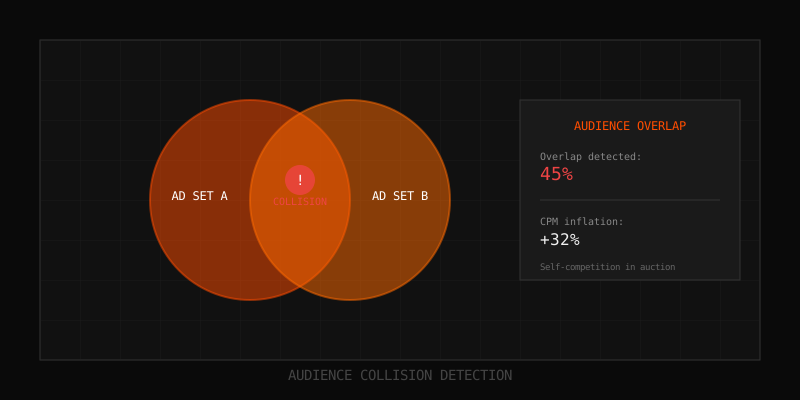
Implementation: Create each audience segment, then exclude the shorter windows from longer ones. A "7-30 day" audience is a 30-day audience with the 7-day audience excluded. This creates mutually exclusive segments.
Messaging by Segment
Hot (0-7 days):
- "Still thinking about [product]?"
- Cart abandonment reminders with product images
- Limited-time offers or free shipping thresholds
- Customer reviews and social proof
Warm (7-30 days):
- "Here's what you're missing..."
- Feature highlights and use cases
- Comparison content (us vs alternatives)
- Customer success stories
Cool (30-60 days):
- "New arrivals you might like"
- Blog content and educational material
- Category-level messaging rather than specific products
- Brand story and values content
Cold (60-180 days):
- "We miss you" re-engagement
- Exclusive returning visitor discounts
- Major product updates or new launches
- Consider whether retargeting is even worth it at this point
Window Selection by Business Type
Fast-Purchase Products (Impulse Buys)
Products under $50 with quick purchase decisions: fashion accessories, beauty products, food, apps.
- Primary window: 7 days
- Secondary window: 7-30 days
- Skip: 60+ days (too late, they bought elsewhere or lost interest)
Rationale: If someone didn't buy a $30 item within a week, they probably won't. Focus budget on high-intent recent visitors.
Considered Purchases (Moderate Research)
Products $50-$500 with 1-4 week consideration: electronics, furniture, fitness equipment, courses.
- Primary window: 14 days
- Secondary window: 14-60 days
- Tertiary window: 60-90 days (lower budget)
Rationale: These purchases take time. Users compare options, wait for payday, discuss with partners. 60-day windows capture legitimate consideration cycles.
High-Ticket Items (Long Sales Cycles)
Products $500+ with multi-week/month decisions: B2B software, luxury goods, travel packages, vehicles.
- Primary window: 30 days
- Secondary window: 30-90 days
- Tertiary window: 90-180 days
Rationale: Expensive purchases have long consideration periods. A user researching a $5,000 software solution in January might not purchase until March. Extended windows make sense.
Subscription/SaaS
Monthly recurring products with trial periods and evaluation phases.
- Primary window: 14 days (trial period + buffer)
- Secondary window: 14-30 days
- Win-back window: 30-90 days for churned trials
Rationale: If they didn't convert during/after trial, focus on trial completers and early dropoffs. Very old visitors likely signed up for a competitor.
Matching Windows to Events
Different pixel events indicate different intent levels. Match retargeting windows to event depth:
Event-Based Window Recommendations
| Event | Intent Level | Recommended Window |
|---|---|---|
| PageView (any page) | Low | 7-14 days max |
| ViewContent (product page) | Moderate | 14-30 days |
| AddToCart | High | 7-14 days |
| InitiateCheckout | Very High | 3-7 days |
| Lead (form submission) | High | 14-30 days |
| CompleteRegistration | High | 7-14 days |
Logic: Higher-intent events (cart, checkout) deserve shorter, more aggressive windows. Lower- intent events (page view) have rapid decay—long windows just add noise.
iOS 14.5 Impact on Window Selection
iOS changes affected retargeting in two ways:
- Smaller pools: 40-60% of iOS users not tracked, shrinking audience sizes
- Delayed attribution: Some conversions attributed up to 72 hours late
Adjustments for Post-iOS 14.5
- Extend windows slightly: If you previously used 7-day, consider 14-day to compensate for pool shrinkage
- Prioritize CAPI events: Server-side tracked events have better coverage for retargeting
- Use on-platform audiences: Video viewers, page engagers, and lead form openers aren't affected by iOS changes
- Combine events: Create audiences of users who completed multiple events (viewed AND added to cart) to ensure higher-quality, more robust pools
Frequency Management by Window
Longer windows accumulate more impressions per user. Manage frequency to prevent fatigue:
Frequency Caps by Window Length
| Window | Max Daily Freq | Max Weekly Freq | Rationale |
|---|---|---|---|
| 0-7 days | 2-3 | 10-12 | High intent, aggressive is OK |
| 7-30 days | 1-2 | 5-7 | Moderate intent, avoid annoyance |
| 30-90 days | 1 | 3-4 | Lower intent, gentle reminders only |
| 90-180 days | 0.5-1 | 2-3 | Re-engagement, not bombardment |
Budget Allocation Across Windows
With limited retargeting budget, allocate based on expected return:
Efficiency-First Allocation
- 60% to highest-performing window (usually 7-14 days)
- 25% to secondary window (usually 14-30 days)
- 15% to extended windows (30-90 days)
- 0% to 90-180 days unless you have excess budget
Scale-First Allocation
- 40% to 7-14 day window
- 30% to 14-30 day window
- 20% to 30-60 day window
- 10% to 60-180 day window
Testing Allocation
- Equal budget across all segments for 2-4 weeks
- Measure true CPA and ROAS per segment
- Reallocate based on actual performance
Common Window Mistakes
Mistake 1: Using Only 180-Day Windows
"Bigger audience is better" thinking. In reality, 180-day windows dilute your highest-intent users with users who've forgotten you. Conversion rates suffer, CPAs rise, and you compete against yourself for impression share.
Fix: Segment windows and allocate budget toward shorter, higher-intent windows.
Mistake 2: Not Excluding Purchasers
Retargeting recent purchasers with acquisition messaging wastes budget. They already bought—why show them "buy now" ads?
Fix: Exclude purchasers (7-30 days depending on repurchase cycle) from all retargeting campaigns.
Mistake 3: Same Creative for All Windows
A user who visited yesterday and a user who visited 60 days ago need different messages. Using identical creative ignores the intent difference.
Fix: Develop creative variants for each window segment. Urgency for short windows, re- engagement for long windows.
Mistake 4: Ignoring Event Depth
Treating all visitors the same. A cart abandoner is far more valuable than a homepage bouncer. Using the same window for both wastes budget on low-intent visitors.
Fix: Create separate audiences by event. Shorter windows for high-intent events (cart, checkout), longer windows for lower-intent events (page view).
Mistake 5: Not Testing Window Performance
Assuming industry benchmarks apply to your business. Your customers might have different consideration cycles.
Fix: Run tests with equal budget across windows for 2-4 weeks. Let data determine optimal allocation.
Key Takeaways
- Intent decays rapidly: 7-day windows convert 3-5x better than 180-day windows
- Segment retargeting into time-based buckets (0-7, 7-30, 30-60, 60-180) with tailored messaging
- Match window length to sales cycle: impulse buys need short windows, high-ticket items need longer
- Match window length to event depth: cart abandoners get 7-day, page viewers get 14-30 day max
- Allocate 60-70% of retargeting budget to your highest-performing (usually shortest) window
- Always exclude recent purchasers to avoid waste
- Test window performance for your specific business—benchmarks are starting points, not rules
FAQ
What's the best retargeting window?
There's no universal best. For most e-commerce, 7-14 days delivers highest ROAS. For B2B or high-ticket items, 30-60 days captures the consideration cycle. Test your specific audience to determine optimal windows.
Should I use 180-day windows at all?
Only if you have budget after fully funding shorter windows, or if you're running re-engagement campaigns specifically designed for dormant users. For standard retargeting, 180-day windows typically underperform.
How do I handle overlap between window segments?
Use exclusions. When creating a 7-30 day segment, exclude the 0-7 day audience. This ensures users only appear in one segment and prevents self-competition.
Do iOS changes mean I should use longer windows?
Slightly longer, but not dramatically. If you used 7-day, consider 10-14 day to compensate for smaller pools. Don't jump to 90-180 day just because pools shrank—you'd be adding low-intent users, not recovering lost high-intent ones.
How often should I test window performance?
Run comprehensive tests quarterly. Consumer behavior changes with seasons, economic conditions, and competitive dynamics. What worked in Q1 might not work in Q4.
Learn more: How it works · Why bundles beat raw thread history